
1Password Review 2025: Is It Still the Most Secure Password Manager?

1Password Review – The Enterprise Benchmark for Polished Security and Travel Privacy (2025)
1Password is widely considered the most polished and user-friendly password manager for power users and enterprises alike. Known for its signature Secret Key—a second layer of encryption that stays only on your devices—it offers a level of security that even a master password breach cannot compromise. With unique features like Travel Mode for physical device privacy and Watchtower for real-time threat intelligence, it remains the gold standard for those who prioritize a premium interface without compromising on technical rigor.
VERIFIED DATA: 1Password utilizes AES-256-GCM authenticated encryption and has a “zero-knowledge” policy. Its security architecture is audited annually by independent firms like Cure53 and NCC Group. In 2025, it continues its spotless record with zero successful data breaches in its company history.
Advanced Security Metrics: Technical Breakdown
1Password distinguishes itself through a dual-key approach. Unlike other managers, your vault is protected by both your Master Password and a locally stored 128-bit Secret Key, ensuring that server-side breaches are virtually harmless to the end user.
| Security Metric | 1Password Standards | Expert Technical Analysis |
|---|---|---|
| Encryption Protocol | + PBKDF2 | 1Password uses AES-256 bit encryption in GCM mode. This provides both confidentiality and data integrity, ensuring no one can tamper with your vault. |
| The Secret Key | 128-bit Account Key | This unique Secret Key is generated locally and never leaves your device. It adds billions of times more entropy to your master password, thwarting brute-force attacks. |
| Privacy Compliance | SOC2 Type 2 / GDPR | Full compliance with global privacy standards. Their Zero-Knowledge Architecture ensures that even 1Password employees cannot reset your password or see your data. |
| Threat Monitoring | Watchtower Dashboard | Integrates with Have I Been Pwned to alert you if your email or passwords appear in public breaches, flagging weak, reused, or compromised credentials. |
| Hardware Support | FIDO2 / YubiKey / Apple Watch | Provides native support for Biometric Unlock (TouchID/FaceID) and physical security keys like YubiKey for robust multi-factor authentication (MFA). |
The 1Password Architecture: Beyond Simple Storage
The 1Password ecosystem is designed for Extended Access Management (XAM), focusing on the gap between IT-managed apps and “Shadow IT” used by employees.
1. Travel Mode: Physical Device Security
An industry-exclusive feature designed for high-risk travel and border crossings.
- Selective Vault Erasure: When Travel Mode is enabled, vaults marked as “not safe for travel” are completely removed from your device.
- Cloud-Only Persistence: The data remains securely in the 1Password cloud but cannot be accessed on the physical device, even if someone forces you to unlock it.
- Instant Recovery: Once you reach a safe destination, turning off Travel Mode restores all vaults with a single click.
2. Watchtower™ Intelligence
A comprehensive security dashboard that acts as your personal cybersecurity consultant.
- Passkey Readiness: Watchtower identifies which of your existing accounts now support Passkeys, allowing you to upgrade to passwordless security.
- Security Score: Provides a quantifiable metric of your “Vault Health” based on password strength and 2FA adoption.
- Dark Web Scans: Proactively monitors the dark web for your sensitive information, alerting you before a compromised account can be exploited.
3. Secure Sharing: 1Password Psst!
A secure way to share individual items with anyone—even those who don’t use 1Password.
- Timed Links: Generate sharing links that expire after one view, one hour, or up to 30 days.
- Identity Verification: Option to require the recipient to verify their email address before they can view the shared secret.
- Vault History: Detailed logs of when shared items were accessed, providing full audit transparency for business users.
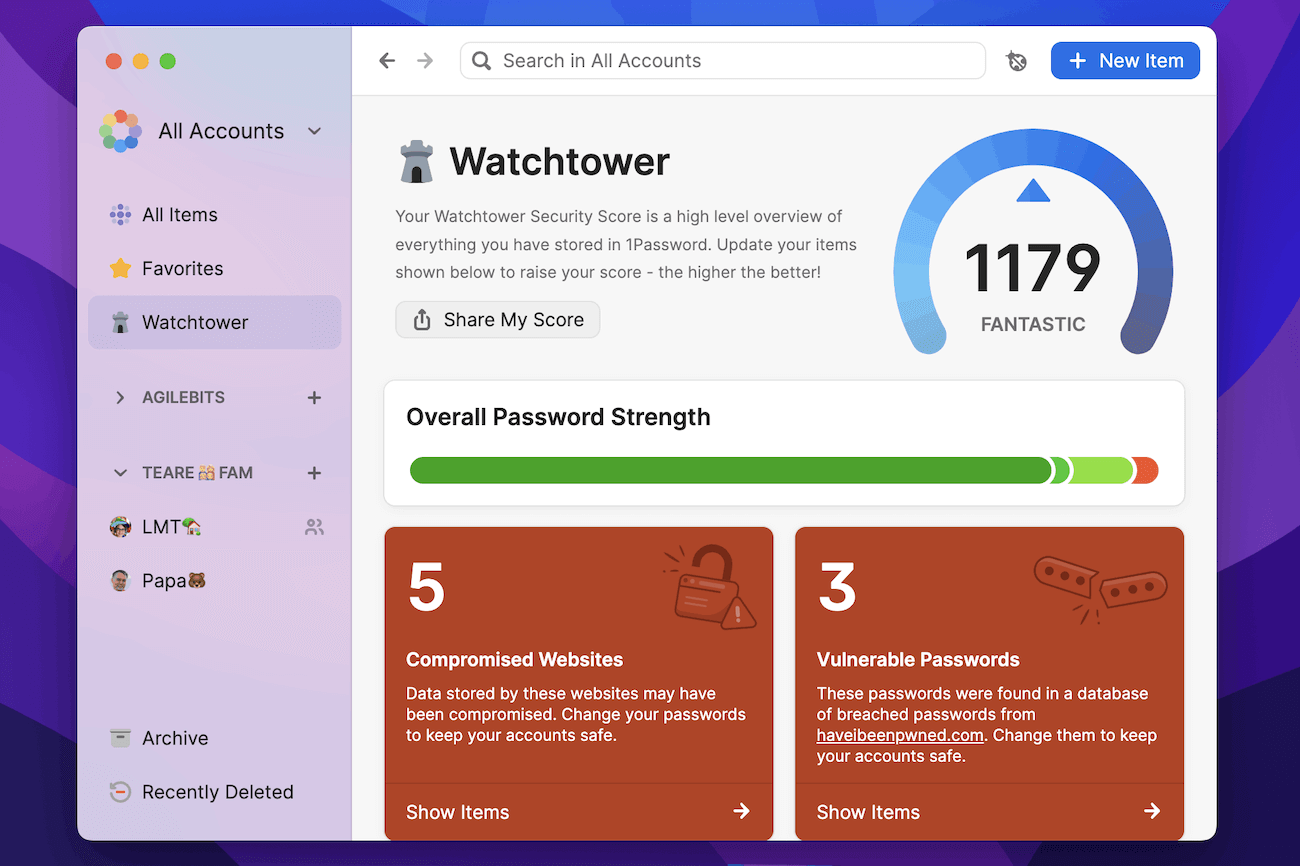
The 1Password Watchtower dashboard provides an instant overview of compromised passwords, weak credentials, and 2FA opportunities.
2025 Performance Evaluation: The User Experience
In our 2025 evaluation, 1Password continues to lead the market in User Interface (UI) design and cross-platform consistency.
Technical Performance Indicators (2025)
- Autofill Precision: The 1Password browser extension is widely considered the most reliable for complex web forms and credit card fields.
- Mobile Integration: Fully optimized for iOS 18 and Android 15, supporting system-level Passkey management and biometric authentication.
- Developer Tools: Offers a robust CLI and VS Code integration, making it a favorite for developers managing SSH keys and API secrets.
- Global Reliability: Maintains a 99.99% service uptime, with data centers in the US, Canada, and Europe to comply with local data residency laws.
While it does not offer a permanent free tier, the level of polish and customer support justifies the subscription for users who want a “no-compromise” security tool.
Setup & Security Recommendations for 2025
Optimize your 1Password experience with these advanced configuration steps:
- Print Your Emergency Kit: Immediately download and print a physical copy of your 1Password Emergency Kit, which contains your Secret Key. Without it, you cannot recover your account.
- Enable Passkeys: Switch your compatible logins to Passkeys for phishing-resistant security that bypasses traditional passwords entirely.
- Configure Collection Views: Use “Collections” to separate your Personal, Work, and Shared vaults, reducing visual clutter and preventing accidental data sharing.
- Set Auto-Lock Timers: On mobile devices, set the 1Password app to auto-lock immediately upon exiting the app to prevent unauthorized local access.
- Utilize Privacy.com Integration: Connect your 1Password account to Privacy.com to generate virtual credit cards directly within your browser for safer online shopping.
Who is 1Password Best Suited For?
- Enterprise & Business Teams: Organizations needing advanced admin controls, SSO integration, and detailed audit logs.
- Frequent Travelers: Individuals who require the Travel Mode feature to protect sensitive data at international borders.
- UI/UX Enthusiasts: Users who want a beautiful, modern app that feels native on macOS, iOS, and Windows.
- Families: The Families plan offers excellent value, including Account Recovery features that the individual plan lacks.
Who Should Consider an Alternative?
- Budget-Focused Users: 1Password has no free version. Those looking for high security at zero cost should look at Bitwarden.
- Open-Source Purists: While their security audits are public, the 1Password source code is proprietary.
- Offline-Only Users: 1Password is a cloud-first service; users requiring an air-gapped, local-only database should use KeePassXC.
Top Password Manager Alternatives
Bitwarden
Primary Strength: The best **Open-Source** alternative offering a powerful free tier and the ability to self-host your own vault server.
NordPass
Primary Strength: Uses the **XChaCha20 encryption** algorithm and offers a simpler, more streamlined interface for casual users.
Proton Pass
Primary Strength: Part of the **Swiss-based Proton ecosystem**, focusing on extreme privacy and integrated email aliasing.
Final Verdict: The Premium Professional Choice
/ 10.0
1Password remains the most complete password management solution on the market. Its Secret Key architecture provides a unique security buffer that most competitors lack, and its Watchtower intelligence is second to none. While it requires a subscription, the investment provides enterprise-grade peace of mind and the most polished user experience available in 2025.
Expert Security Conclusion
If you are looking for a password manager that balances ironclad dual-layer security with a world-class user interface, 1Password is the undisputed leader for 2025.
Secure Your Digital Life with 1Password
Join over 100,000 businesses and millions of individuals who trust 1Password every day.