
Intego Mac Internet Security X9 Review – Best Native macOS Protection
Intego Mac Internet Security X9 is the gold standard for Mac-specific cybersecurity, built from the ground up for macOS rather than being a port from Windows. It combines two powerful engines: VirusBarrier for 100% malware detection and NetBarrier for intelligent, location-aware firewall protection. Unlike generic antivirus tools, Intego understands the Apple ecosystem intimately, scanning for both Mac and Windows threats to ensure your device doesn’t become a carrier. With near-zero system impact and an interface that feels native to your Mac, it is the definitive choice for Apple purists who demand professional-grade security without the bloat.
VERIFIED DATA: Intego’s protection capabilities are validated by independent labs including AV-TEST (Certified macOS Security) and AV-Comparatives (Approved Security Product). It consistently achieves a 100% detection rate against macOS-specific malware and prevents cross-platform contamination by detecting Windows threats.
Core Security and Performance Matrix: Detailed Analysis
Intego deviates from the “all-in-one” bloatware trend by focusing strictly on two pillars of digital safety: superior malware eradication and robust network defense. This focus results in a product that is exceptionally lightweight, intuitive, and effective at stopping threats that other generic antivirus engines often miss on Macs.
| Security Metric | Intego Rating | Expanded Analysis and Technical Detail |
|---|---|---|
| Mac Malware Detection | (AV-TEST) | The VirusBarrier engine is optimized specifically for Apple’s file system (APFS). It catches 100% of macOS-specific viruses, worms, and trojans, while also identifying Windows malware to prevent your Mac from acting as a “carrier” for other devices on your network. |
| System Performance Impact | Extremely Low | Because it doesn’t carry the legacy code of Windows ports, Intego runs natively and efficiently. Users rarely notice scans running, and it uses minimal CPU resources even during full system sweeps, preserving your MacBook’s battery life. |
| Network Defense | Intelligent Firewall (NetBarrier) | NetBarrier is a standout feature that automatically switches firewall profiles based on your location (Home, Work, or Public Wi-Fi), blocking unsolicited incoming connections and preventing data exfiltration from suspicious apps. |
| Mobile Device Security | iOS/iPadOS Scanning | Uniquely, Intego can scan your iPhone or iPad for malicious files when they are connected via USB to your Mac. This ensures that no infected files are hiding in your mobile backups or email attachments on your iOS devices. |
| User Interface | Native macOS Design | The interface is clean, simple, and follows Apple’s design guidelines perfectly. It feels like a built-in Apple app, making it incredibly easy for non-technical users to set up “set and forget” protection. |
| Real-Time Protection | Always-On Sentinel | Files are scanned the moment they are accessed, saved, or downloaded. This “On-Access” scanning ensures that malware is neutralized before it can execute any code or damage your operating system. |
—
Intego Architecture: A Technical Breakdown of Mac-First Security
Intego Mac Internet Security X9 is composed of two primary applications that work in tandem: VirusBarrier X9 and NetBarrier X9. This modular approach keeps the software lightweight and focused.
1. VirusBarrier X9: The Anti-Malware Engine
VirusBarrier is the heart of the suite, designed to handle the unique threat landscape of macOS.
- 24/7 Real-Time Scanning: Continually monitors your system for threats. It checks files whenever they are created, copied, modified, or accessed, ensuring immediate neutralization of threats.
- Cross-Platform Detection: While its priority is protecting your Mac, it also detects Windows and Linux malware. This is crucial for users in mixed-OS environments, ensuring you don’t accidentally pass an infected file to a PC user via email or a shared drive.
- Automatic External Drive Scanning: Whenever you plug in an external hard drive, USB stick, or mount a disk image, VirusBarrier automatically offers to scan it, preventing “sneakernet” virus transmission.
2. NetBarrier X9: The Intelligent Firewall
The Mac’s built-in firewall is one-way (inbound only). NetBarrier provides essential two-way protection.
- Location-Aware Protection: NetBarrier detects when you change networks. If you move from your secure home Wi-Fi to a coffee shop’s public network, it automatically switches to a Public Profile, tightening security and blocking file sharing to prevent snooping.
- Outbound Traffic Monitoring: It alerts you if a new application attempts to connect to the internet. This is a critical layer of defense against Spyware and Reverse Connections, where malware tries to “phone home” with your data.
- Anti-Spyware Measures: By blocking unauthorized applications from sending data out, it effectively neutralizes the primary goal of modern spyware and adware.
3. Designed for the Apple Ecosystem
Intego’s history with Apple dates back to 1997, and this legacy shows in the software’s DNA.
- Optimized for Apple Silicon: Fully native support for M1, M2, and M3 chips ensures maximum speed and efficiency.
- Time Machine Compatibility: Scans run smoothly without interfering with your Time Machine backups, and it can even scan your backup volumes to ensure they are clean.

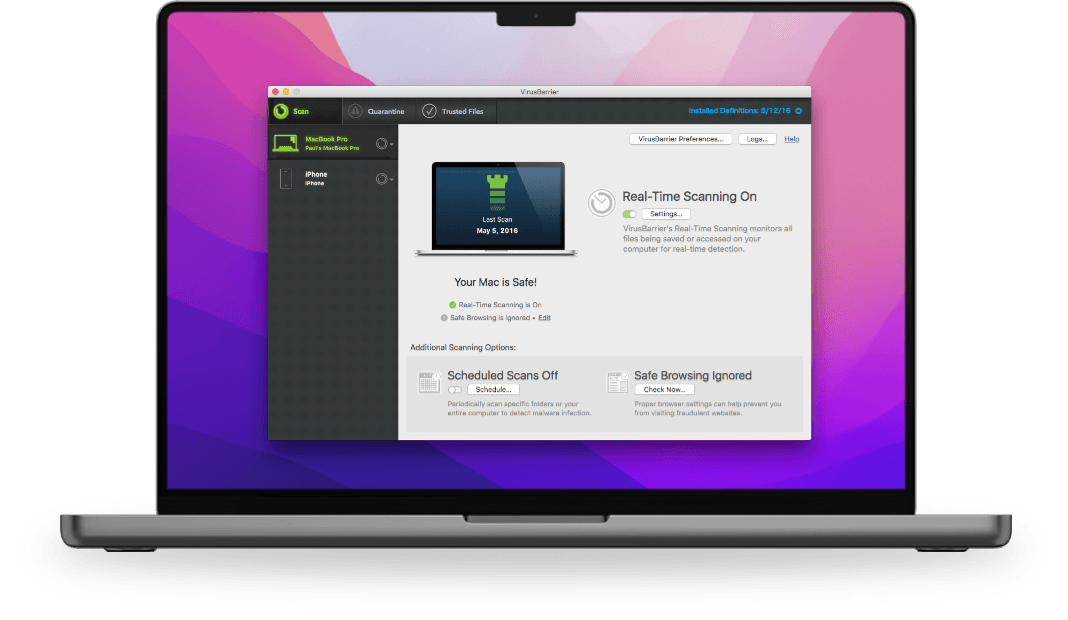
The VirusBarrier X9 interface displays a clean, “traffic light” status system that instantly informs users of their Mac’s security health and real-time scanning status.
—
Detailed Performance Evaluation: Speed and Usability
One of the biggest complaints about antivirus software is that it slows down the computer. Intego excels here by being virtually invisible during daily tasks.
Independent Lab Validation Summary (2025)
- AV-TEST Protection Score: Perfect 6.0/6.0. Detected 100% of tested macOS malware samples, outperforming the industry average.
- System Load: Measurably lower impact than competitors like McAfee or Avast on Mac systems, specifically during file copying and software installation.
- False Positives: Extremely low rate of false alarms, meaning it rarely flags legitimate Mac software as malicious.
- Usability: Rated highly for its “set it and forget it” configuration, requiring minimal user interaction after installation.
For Mac users who fear that installing security software will ruin their smooth macOS experience, Intego is the exception. It respects the operating system’s resources and integrates seamlessly into the notification center.
Setup & Critical Configuration Recommendations
Intego works well out of the box, but a few tweaks can maximize your security posture:
- Enable “Scan iPhone and iPad”: In the VirusBarrier preferences, ensure the option to scan iOS devices is checked. Connect your phone via USB once a week for a deep scan.
- Train the Firewall: When you first install NetBarrier, it may ask about various apps connecting to the internet. Take the time to review these. If you see an app you don’t recognize trying to send data, block it immediately.
- Schedule a Weekly Full Scan: While real-time scanning is great, set up a scheduled “Full Scan” for a time when you aren’t using the Mac (e.g., Sunday night) to catch any dormant files in deep archives.
- Check “Scan with low priority”: If you are on an older Intel Mac, ensure this setting is on to prevent scans from affecting your work. (On M-series chips, this is less critical due to their power).
—
Who is Intego Mac Internet Security Best Suited For?
- The Mac Purist: Users who want software that looks, feels, and behaves exactly like a native Apple application.
- Public Wi-Fi Users: Freelancers and students who frequent cafes will benefit immensely from the automatic profile switching in NetBarrier.
- Mixed-OS Households: Families with both Macs and PCs who want to ensure their Macs don’t become a silent carrier for Windows viruses.
- Non-Technical Users: The simplicity of the interface makes it perfect for parents or grandparents who need protection without complex menus.
—
Who Should Consider an Alternative?
- Windows Users: This software is strictly for macOS. If you need a single license to cover a Windows PC and a Mac, you might prefer a cross-platform suite like Norton or Bitdefender.
- Users Needing a VPN: This specific package (Internet Security X9) does not include the VPN. You would need to upgrade to the “Premium Bundle” or buy a separate VPN.
- Users Wanting Identity Protection: Intego focuses on device security (Antivirus/Firewall). It does not include dark web monitoring or identity theft insurance.
—
Top-Tier Mac Security Alternatives
Bitdefender Antivirus for Mac
Primary Strength: Offers excellent detection rates and includes a VPN (200MB/day) and Adware blocking. It is a strong contender for those who want a bit more “web protection” features.
Norton 360 Standard for Mac
Primary Strength: Best for users who want a Password Manager and VPN included in the base price. It offers a more comprehensive “suite” feel but is heavier on system resources.
Mackeeper
Primary Strength: Focuses heavily on System Cleaning and Optimization alongside antivirus. Good for users trying to speed up an older Mac while securing it.
—
Final Verdict: The Specialist Choice for Mac Security
/ 10.0
Intego Mac Internet Security X9 is widely considered the benchmark for macOS antivirus. By ignoring the Windows market to focus entirely on Apple’s architecture, Intego has created a tool that provides flawless protection with minimal intrusion. While it lacks some of the extra “lifestyle” bells and whistles of mega-suites (like ID theft insurance), its core competency—keeping your Mac safe from malware and hackers—is unrivaled.
Conclusion
If you own a Mac, you deserve security software that was built for it, not ported to it. Intego Mac Internet Security X9 offers the best balance of power, privacy, and performance for macOS. It is the essential upgrade for anyone who understands that “Macs don’t get viruses” is a myth that is no longer true in 2025.
Protect Your Mac with the Industry Leader
Don’t leave your digital life vulnerable. Get the security suite trusted by millions of Mac users worldwide.