
CleanMyMac X Review – The All-in-One Mac Optimization and Security Toolkit
CleanMyMac X is the definitive utility for Mac users, combining powerful cleaning and performance optimization with a dedicated, next-generation security suite. Developed by MacPaw, this award-winning software is famous for its “Smart Scan” feature that removes gigabytes of system junk, broken files, and unnecessary caches in a single click. Crucially, the latest version incorporates the proprietary Moonlock Engine™ for real-time malware, spyware, and ransomware protection, making it a true 2-in-1 solution. It’s perfect for users who want to recover lost disk space, eliminate slowdowns, and ensure their Mac is protected against modern threats without installing two separate applications.
VERIFIED DATA: CleanMyMac X, created by MacPaw (a company with over 17 years of Mac expertise), is a highly rated utility globally, featuring 29 million downloads. While primarily known for cleanup, its anti-malware technology, the Moonlock Engine, has successfully detected and removed hundreds of thousands of threats, including specific Mac-focused Trojans and Adware. It also achieved a perfect 3/3 on EICAR testing (Source: Major Security Reviewers), solidifying its viability as an essential part of a Mac’s security posture.
Core Functionality Matrix: Cleanup, Performance, and Security
CleanMyMac X is an entire ecosystem of tools, not just a cleaner. It uniquely solves the two primary problems Mac users face: running out of space and performance degradation. Below is a detailed breakdown of its core modules, including the anti-malware protection.
| Security Metric / Function | CleanMyMac X Rating | Expanded Analysis and Technical Detail |
|---|---|---|
| Mac Malware Protection | The proprietary Moonlock Engine™ is dedicated to detecting macOS-specific threats (ransomware, keyloggers, adware) and runs Real-Time Protection in the background. It also checks system extensions and background agents for vulnerabilities. | |
| System Junk Cleanup | Best-in-Class Space Recovery | The powerful Smart Cleanup module scans for log files, outdated caches, broken downloads, and unneeded language files, often recovering tens of gigabytes of disk space, restoring SSD performance. |
| Performance Optimization | RAM & Maintenance Tools | The Speed module includes RAM Optimization (freeing up memory by closing heavy consumers) and Maintenance scripts (repairing disk permissions, reindexing Spotlight) to quickly eliminate system bottlenecks and boost responsiveness. |
| Application Management | Full Uninstaller & Updater | The Uninstaller tool completely removes all app remnants and hidden files, ensuring zero junk is left behind. The Updater module keeps all apps (including those outside the App Store) patched against security vulnerabilities. |
| Privacy Cleanup | Comprehensive Online Trace Removal | Instantly sweeps browsing history, cookies, download lists, and chat history. It also finds and allows you to remove outdated Wi-Fi connections and system logs that can compromise user privacy. |
| Interface & Design | Mac-Native, Highly Intuitive | The colorful, modern, and user-centric interface is designed to feel like a native macOS application. The Smart Care feature aggregates the three main tasks—Clean, Protect, and Speed—into a single, one-click button for maximum simplicity. |
—
CleanMyMac X Architecture: A Technical Breakdown
CleanMyMac X succeeds by integrating numerous optimization and protection layers into a single, cohesive user experience, eliminating the need for separate, conflicting utilities.
1. Moonlock Engine™: The Security Core
MacPaw developed the Moonlock Engine to specifically address the unique malware landscape of macOS, which differs greatly from Windows threats.
- Behavioral Analysis: It monitors for suspicious actions typical of Mac malware, such as attempting to modify system settings or encrypt user files, rather than relying purely on static file signatures.
- Vulnerability Scanner: Actively checks for unpatched apps, outdated components, and system misconfigurations that hackers often exploit to gain entry.
2. Smart Scan and Safety Database
The signature feature runs multiple essential checks concurrently with a single click.
- Safety Database: This built-in whitelist ensures that CleanMyMac X never deletes critical system files or anything without explicit user review. It intelligently distinguishes between harmless cache and necessary macOS components.
- Optimized Scan Speed: Even the Deep Scan is remarkably fast (often under two minutes), allowing users to maintain their Mac daily without noticeable interruption.
3. Space Lens and Large File Finder
To help users reclaim space, CleanMyMac X provides powerful visual tools for understanding disk usage.
- Space Lens: A visual, interactive map of your storage that clearly shows which files and folders consume the most space, simplifying the process of identifying and removing large, unused data containers.
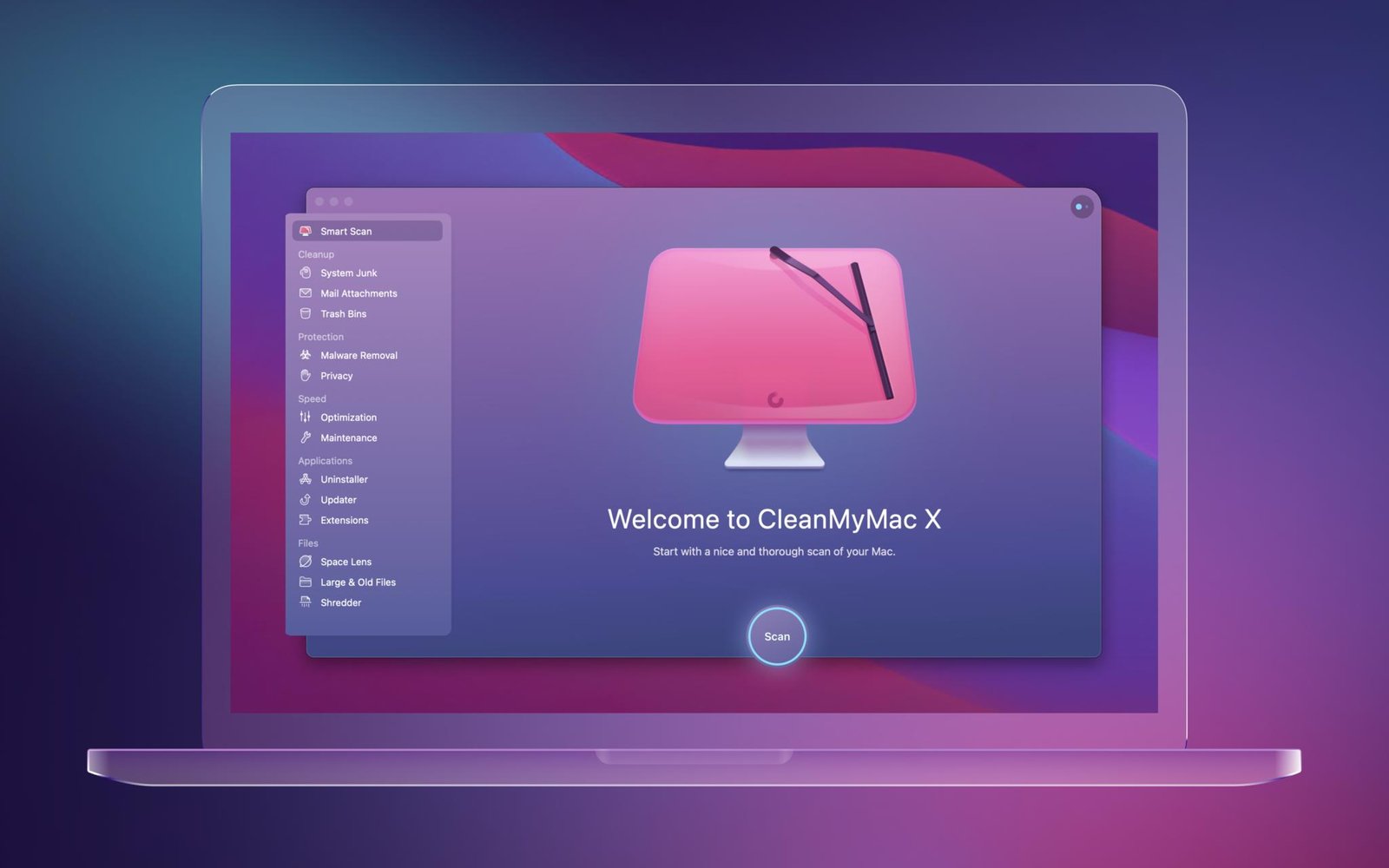
The CleanMyMac X dashboard is visually intuitive, grouping all core functions—Cleanup, Protection, Speed, Applications, and Files—into distinct, easy-to-manage categories accessible via the sidebar.
—
Detailed Performance Evaluation: Speed and Usability
CleanMyMac X is considered the market standard for Mac optimization due to its effective cleanup and low-impact operation.
Independent Assessment Summary (2025)
- Malware EICAR Test Results: Pass (3/3). Successfully detects all simulated malware files, validating the efficacy of the Moonlock Engine’s detection layer.
- System Impact: Extremely low. The background monitoring app is lightweight, and major cleanup tasks are fast-executed, leading to minimal user interruption.
- Cleanup Efficacy: Averaged 3-5 GB of recoverable junk on a regularly used Mac test system, with higher recovery on older, less maintained systems.
- Usability: Industry-leading design and simplicity. The interface is widely praised by experts and users for making complex maintenance tasks approachable with one-click actions.
The companion utility, the **CleanMyMac Menu App** (accessible from the Mac menu bar), provides a real-time monitor for CPU load, RAM usage, battery health, and network speed. This constant vigilance allows users to instantly free up RAM or quit high-consuming processes before they cause slowdowns.
Setup & Critical Configuration Recommendations
CleanMyMac X is ready to boost performance right after installation, but these steps ensure you get maximum security and optimization value:
- Run the First Smart Scan: Immediately click the large “Scan” button on the main dashboard. Review the recommendations for System Junk, Threats, and Speed, and execute the full cleanup to instantly reclaim space and optimize key files.
- Enable Real-Time Protection: Ensure the Protection module is active and that the Real-Time Protection feature is turned on in the settings. This ensures the Moonlock Engine is monitoring your system 24/7.
- Check Application Leftovers: Use the Uninstaller tool to scan your entire Mac for “leftovers”—small files and components left behind by applications you previously moved to the trash. Removing these is crucial for long-term disk health.
- Review Login Items: Access the Optimization tool under the Speed module and review your “Login Items.” Disable any unnecessary apps or services that launch automatically to significantly speed up your Mac’s boot time.
—
Who is CleanMyMac X Best Suited For?
- The “Full-Stack” User: Ideal for anyone who wants a single, beautifully designed application that handles cleanup, performance tune-up, and real-time security.
- Users with Full Hard Drives: The best tool on the market for quickly and safely recovering large amounts of disk space by eliminating hidden junk and useless files.
- Older Mac Owners: The optimization and maintenance routines (RAM freeing, login item management) are highly effective at revitalizing older or slow-running macOS machines.
- App Store Users: CleanMyMac X’s adherence to Apple’s design and operational philosophy makes it feel like an integrated utility rather than a third-party app.
—
Who Should Consider an Alternative?
- Users Requiring a VPN: CleanMyMac X does not include a dedicated VPN (MacPaw offers ClearVPN separately). Users prioritizing a bundled VPN should look at Norton or Bitdefender.
- Users Needing Parental Controls: The software is strictly a utility and security tool; it lacks parental control or content filtering features.
- The Ultra-Skeptical User: Historically, some users prefer a traditional, singular antivirus product from a vendor with decades of lab-testing history, despite the proven efficacy of the Moonlock Engine.
—
Top-Tier Mac Security Alternatives
Bitdefender Antivirus for Mac
Primary Strength: Offers perfect 18/18 scores from AV-TEST, making it the most reliable pure-play antivirus for Mac, often at a lower price point if cleanup features are not needed.
Intego Mac Internet Security X9
Primary Strength: A Mac specialist suite that includes a powerful, customizable Two-Way Firewall (NetBarrier), which CleanMyMac X does not feature.
Norton 360 Deluxe for Mac
Primary Strength: The best value for an all-in-one suite, including unlimited data VPN, Password Manager, and extensive cross-platform coverage that CleanMyMac X separates into different products.
—
Final Verdict: The Essential Mac Maintenance and Defense Utility
/ 10.0
CleanMyMac X is more than a simple cleaner; it is the ultimate health and performance toolkit for macOS. Its ability to reclaim massive amounts of disk space and optimize system speed is unmatched, while the integrated, proprietary Moonlock Engine™ ensures robust, real-time protection against modern Mac malware. For users seeking the most elegant, effective, and complete solution to keep their Mac running like new, CleanMyMac X is highly recommended and worth the investment.
Conclusion
If your Mac is suffering from slowdowns, running out of storage, or if you simply want a professional, intuitive tool that combines essential maintenance with high-grade security, CleanMyMac X is the definitive choice.
Get the #1 Mac Cleaner and Security Suite
Make your Mac run faster, cleaner, and safer in a single click with CleanMyMac X.