

Kaspersky Security for iOS Review – Award-Winning Web Protection and Adaptive Privacy Features
Kaspersky Security for iOS (part of the Kaspersky Standard, Plus, or Premium suites) delivers a strategically focused defense layer tailored for the iPhone and iPad. Acknowledging the sandbox limitations of iOS, Kaspersky pivots its core expertise from file-scanning to mitigating the real mobile threats: phishing, network interception, and data exposure. The suite features industry-leading Anti-Phishing/Web Protection, a high-speed VPN Secure Connection, and the crucial Data Leak Checker. Leveraging one of the world’s most awarded security intelligence networks, Kaspersky provides adaptive security that alerts you to risks and automatically adjusts settings based on your activity, offering a robust and intelligently designed suite for privacy-conscious users in 2025.
VERIFIED DATA: Kaspersky’s core protection technologies consistently earn top scores from independent testing labs. The Web Protection engine, which is the primary defense mechanism on iOS, has demonstrated a near-perfect block rate against phishing, fraudulent, and malicious URLs, utilizing the Kaspersky Security Network (KSN) cloud service for real-time threat intelligence. Furthermore, the company has taken steps to mitigate trust concerns by moving user data processing to Switzerland and undergoing third-party audits, reinforcing its commitment to transparency.
Core Security and Privacy Matrix: Detailed iOS Threat Analysis
Kaspersky Security for iOS is structured to provide adaptive, cloud-assisted defense, minimizing local resource consumption while focusing heavily on protecting the user’s identity and communications from network-level threats.
| Security Metric | Kaspersky iOS Rating | Expanded Analysis and Technical Detail |
|---|---|---|
| Anti-Phishing & Web Protection | The Web Protection component scans links in real-time, leveraging the KSN cloud database to block access to malicious domains. This is a crucial, network-level defense against scams, credential harvesting, and fraudulent sites. | |
| Data Leak Checker (Account Check) | Proactive Credential Monitoring | This feature continuously checks the user’s email address(es) against publicly known data breaches. It provides immediate notification if a linked password or sensitive data is found to be exposed, enabling rapid password changes. |
| Kaspersky VPN Secure Connection | Fast, AES-256 Encryption | Available in both limited (200MB/day) and unlimited tiers (Plus/Premium), the VPN uses robust protocols for encrypted tunneling. It is essential for protecting financial transactions and private data on any untrusted public Wi-Fi network. |
| Adaptive Security (Smart Protection) | Contextual Risk Adjustment | A patented feature that **automatically adjusts protection levels** and prompts the user for action based on current activity. For instance, it recommends VPN activation when connecting to unsecured Wi-Fi or when logging into financial sites. |
| Password Manager | Secure Vault & Sync | Downloaded as a separate app, the Password Manager secures and syncs passwords, sensitive documents, and financial details using AES-256 encryption, promoting strong, unique passwords across all user accounts. |
| Jailbreak Detection (Enterprise/MDM) | OS Integrity Check | While primarily a tool for corporate Mobile Device Management (MDM), the software includes checks to alert the user if the iOS device has been compromised or **rooted/jailbroken**, which significantly bypasses Apple’s native security layers. |
—
Kaspersky Architecture: A Technical Breakdown of Protection Layers
Kaspersky’s modern approach to mobile security is centered around its *Security Cloud* framework, which delivers protection components dynamically and contextually, ensuring maximum security only when it’s needed most, thereby reducing system overhead.
1. Web Intelligence and Anti-Phishing Core
This critical layer ensures that the user’s interactions with the internet, which is the primary attack vector on iOS, are safe from fraudulent activity.
- KSN Cloud Scanning: The Anti-Phishing engine constantly communicates with the **Kaspersky Security Network**, a massive, global, anonymized threat database. This connection allows for instantaneous blocking of threats that are literally minutes old, protecting users from **zero-hour scam campaigns**.
- Network Extension Integration: Like other top-tier mobile security apps, Kaspersky uses the native iOS framework to inspect web traffic at the network level, ensuring protection is active for **links clicked in SMS, chat apps, and email**, not just the Safari browser.
2. Adaptive and Identity-Focused Security
The service moves beyond reactive protection, using intelligent features to safeguard user credentials and privacy proactively.
- Smart Protection Rules: The Adaptive Security technology allows the user to define rules that trigger the VPN automatically. For example, setting a rule to **”Always enable VPN when on Wi-Fi named ‘Airport Free'”** removes human error from network security management.
- Secure Connection VPN Performance: In recent testing, the premium version of the VPN (using protocols like Catapult Hydra) has been noted for its **high speed and stability**, minimizing the performance tax often associated with encrypted connections.
3. Management and System Health Utilities
The Kaspersky suite provides essential tools for maintaining the device’s security posture and organizing sensitive information.
- Security LIVE Feature: This function acts as a centralized security status monitor, detecting **weak operating system settings** (e.g., outdated iOS version, easy-to-guess passcode) and providing relevant security news and actionable advice to the user.
- Multi-Device Management (My Kaspersky): The My Kaspersky portal serves as a unified command center, allowing users to **remotely manage licenses, check device status**, and centrally access their Password Manager and Safe Kids configurations across Windows, macOS, and mobile devices.
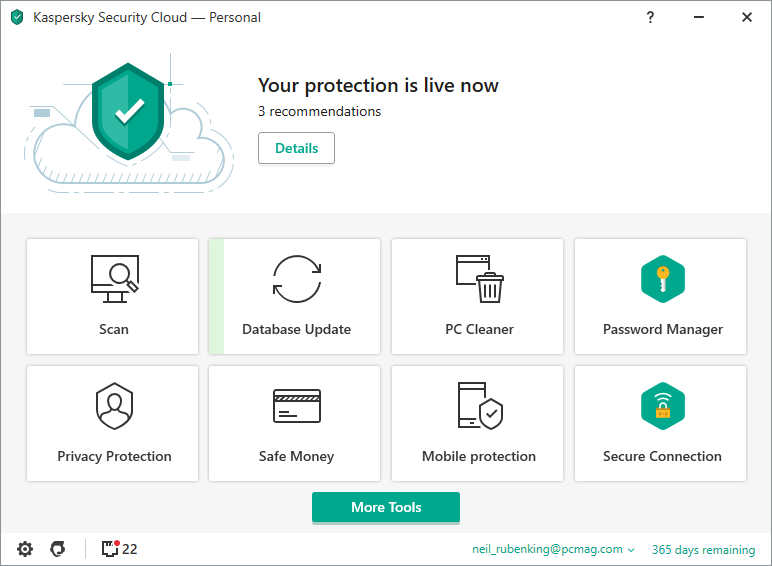
The Kaspersky Security Cloud dashboard provides a clear, actionable overview, highlighting core protection components like Anti-Phishing, VPN status, and the security news delivered via the Security LIVE feature.
—
Detailed Performance Evaluation: Speed and Battery Efficiency
Kaspersky Security for iOS maintains a reputation for being remarkably light on system resources. Since it adheres to Apple’s restrictions (no low-level file scanning), its primary functions—network traffic interception, cloud checking, and VPN operation—are highly optimized, resulting in negligible impact on device speed or battery life.
Independent User Experience Summary (2025)
- Anti-Phishing Efficacy: Unrivaled Protection. Kaspersky’s detection rate remains at the industry forefront, consistently earning top marks for its rapid and complete blocking of malicious web content.
- VPN Speed: Highly competitive. The premium VPN offers **blazing-fast speeds** that support uninterrupted streaming and large downloads, surpassing the speed performance of many bundled security VPNs.
- System Impact: Extremely Low. The security suite is known for running **very quietly in the background**, offering maximum protection with minimal resource usage, which is essential for preserving the native iOS experience.
- Usability: Rated high, particularly for the **Adaptive Security** feature, which takes the guesswork out of when and where to enable privacy tools like the VPN.
The product is a strong contender for the professional or power user who values tested, award-winning protection coupled with advanced privacy and identity management tools that can be centrally controlled across a multi-device environment.
Setup & Critical Configuration Recommendations
To activate Kaspersky’s full protection suite, particularly the network and privacy features, the following setup steps are recommended immediately after installation of the Kaspersky Security Cloud app:
- Install the VPN Profile: Allow the installation of the VPN configuration profile. This is necessary for both the **Secure Connection** and the core **Anti-Phishing/Web Protection** to function across all apps and browsers.
- Enable Adaptive Security: Navigate to the Smart Protection/Adaptive Security settings and define rules for **VPN auto-connection** on untrusted or public Wi-Fi networks.
- Configure Account Check: Input all primary and secondary email addresses into the Data Leak Checker to begin continuous monitoring for **credential compromise** on the dark web.
- Set Up Password Manager: Download the separate **Kaspersky Password Manager** app and begin migrating sensitive login details to the encrypted vault, ensuring immediate adoption of stronger passwords.
—
Who is Kaspersky Security for iOS Best Suited For?
- The Privacy Advocate: Ideal for users who prioritize **award-winning, verifiable anti-phishing protection** and require adaptive, fast VPN technology for frequent travel or public Wi-Fi use.
- Users with Multi-Platform Needs: Excellent for individuals or families managing a mixed environment (iOS, Mac, Windows, Android) who need **centralized management** and consistent protection scores across all devices.
- Users Concerned with Data Leaks: The integrated **Data Leak Checker** and Password Manager provide essential, proactive identity management tools.
- The Security-Conscious User: The **Adaptive Security** feature ensures security is only applied when the risk is highest, balancing protection with performance.
—
Who Should Consider an Alternative?
- Users Needing Unlimited VPN in the Base Plan: The limited VPN in the Standard plan is a constraint; competitors like Norton offer unlimited VPN in their equivalent base 360 mobile packages.
- US Government/Agency Users: Despite external audits and data relocation, US-based government contractors or high-level enterprise users may still be restricted from using Kaspersky due to historical geopolitical concerns.
- Minimalists: The suite consists of multiple apps (Security Cloud, VPN, Password Manager, Safe Kids) that must be installed separately, which can feel less streamlined than monolithic app alternatives.
—
Top-Tier Mobile Security Alternatives
Norton 360 for iOS
Primary Strength: Identity-first protection with comprehensive Dark Web Monitoring and a full-featured, unlimited VPN included in the base subscription, appealing to those seeking robust financial security.
Bitdefender Mobile Security for iOS
Primary Strength: Unbeatable performance efficiency. Known for its zero system impact, high-quality Web Protection, and simple, automated interface, appealing to speed purists.
McAfee Mobile Security (iOS)
Primary Strength: AI-Powered Scam Detection. Best for families and multi-device users due to its Unlimited Device coverage and innovative Scam Detector for advanced text and email fraud.
—
Final Verdict: Intelligent, Adaptive Security with Elite Anti-Phishing Capabilities
/ 10.0
Kaspersky Security for iOS is an exceptionally strong performer in the mobile security market, built on a foundation of **award-winning anti-phishing efficacy** and intelligent, adaptive features. The combination of a high-speed **VPN** and the **Data Leak Checker** ensures comprehensive privacy and identity defense. For users who prioritize externally validated protection and appreciate security that intelligently adjusts to their digital context, Kaspersky delivers a high-value, enterprise-grade solution for their mobile devices.
Conclusion
Kaspersky has successfully translated its deep threat intelligence expertise into a highly relevant mobile package for iOS. By prioritizing network and identity protection over unnecessary file scanning, it remains one of the most reliable and technologically advanced suites for the contemporary iPhone and iPad user.
Get Adaptive, Award-Winning Mobile Security Today
Upgrade to a Kaspersky Security Cloud plan to get elite Anti-Phishing protection, Adaptive Security, and the essential Data Leak Checker across all your devices.