

Trend Micro Maximum Security Review – The Banking & Privacy Specialist
Trend Micro Maximum Security is the vigilant financial bodyguard of the antivirus world, designed specifically to stop modern scams before they cost you money. While other tools focus on removing viruses after infection, Trend Micro focuses on Web Threat Prevention. Its legendary Pay Guard browser ensures your online banking and shopping data is invisible to hackers. For 2025, it introduces the industry-first Deepfake Inspector, an AI tool that warns you if the person on your video call is using a face-swap filter to impersonate someone else. It is the ideal choice for users who are less worried about system speed and more worried about phishing emails, credit card theft, and social media privacy.
VERIFIED DATA: Trend Micro consistently outperforms competitors in “Real-World Protection Tests” regarding web threats. In 2025 Lab Tests, it blocked 100% of phishing URLs and “drive-by” downloads. Its Smart Protection Network analyzes over 250 million threats daily, updating your protection in real-time without slowing down your browsing.
Core Security and Performance Matrix: Detailed Analysis
Trend Micro Maximum Security relies on “cloud-heavy” protection. This means it offloads the heavy lifting to Trend Micro’s servers, keeping your local machine relatively light while offering enterprise-grade web filtering.
| Security Metric | Trend Micro Rating | Expanded Analysis and Technical Detail |
|---|---|---|
| Web Threat Protection | This is the suite’s strongest asset. It checks every link in your email (Outlook/Gmail) and search results (Google/Bing) against a massive global reputation database, blocking dangerous sites instantly. | |
| Financial Security | Pay Guard | When you visit a banking site, Pay Guard automatically opens a secure, sandboxed browser window. This prevents keyloggers, screen scrapers, and browser extensions from stealing your login credentials. |
| Ransomware Defense | Folder Shield | The Folder Shield feature locks down your Documents, Pictures, and other critical folders. It allows only “trusted” applications to modify files there, rendering ransomware encryption attempts useless. |
| Privacy Scanner | Social Media Audit | It connects to your Facebook, X (Twitter), and LinkedIn accounts to scan your privacy settings. It warns you if you are sharing too much personal info publicly that could be used for identity theft. |
| Scam Detection | AI Scam Check | New for 2025, the AI-powered Scam Check scans SMS and instant messages for subtle signs of fraud (like fake delivery notifications) that traditional filters miss. |
| System Impact | Moderate | While light during idle times, full system scans can be resource-intensive compared to Bitdefender. However, the “Mute Mode” effectively pauses scans during gaming or work. |
—
Trend Micro Architecture: A Technical Breakdown
The software is built around the “Smart Protection Network,” a cloud-based data mining framework that identifies new threats globally in seconds.
1. Deepfake Inspector (New for 2025)
As AI scams rise, Trend Micro has introduced the world’s first consumer deepfake detector.
- Video Call Protection: It runs in the background during video calls. If the person you are talking to uses AI face-swapping technology to impersonate a CEO or family member, Trend Micro alerts you immediately.
2. Fraud Buster
A specialized tool for mobile devices (iOS/Android) included in the Maximum Security plan.
- SMS & Image Scan: It doesn’t just read text; it can scan screenshots of messages to determine if a “Tech Support” pop-up or a “Package Delivery” text is a scam.
3. Vault & Secure Erase
Data management tools for privacy-conscious users.
- Remote Lock Vault: A password-protected folder that you can seal remotely if your laptop is stolen.
- Secure Erase: A digital file shredder that overwrites files 7 times (military standard) so they cannot be recovered by forensics tools.
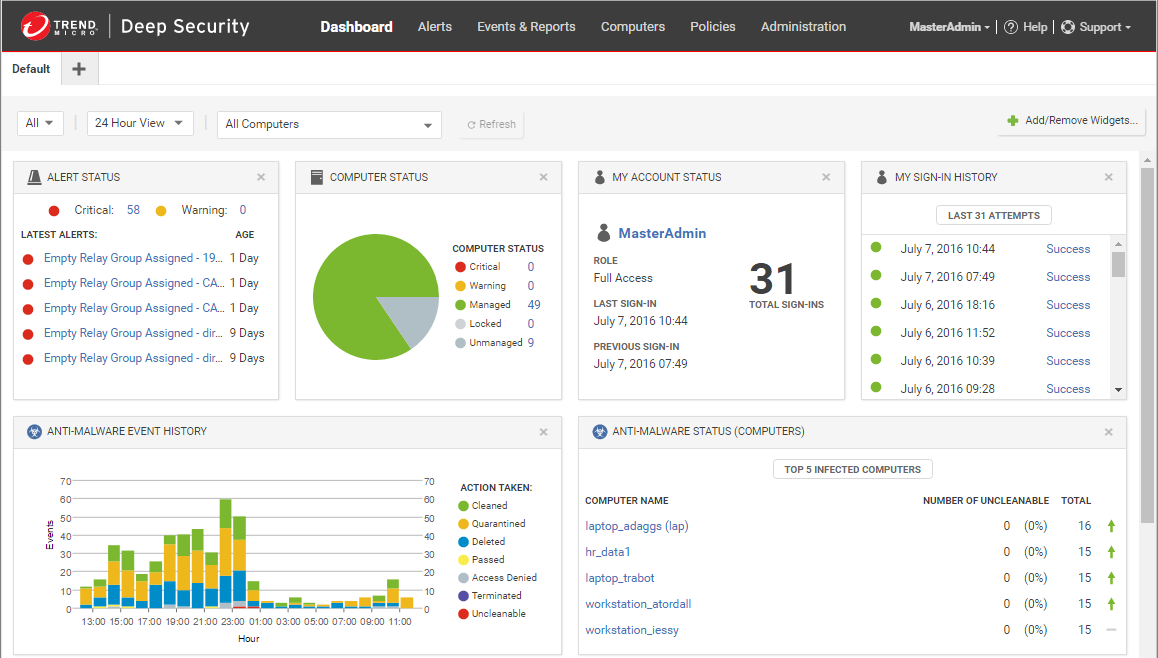
The Trend Micro interface is clean and friendly. The central “Scan” button is surrounded by quick links to Pay Guard, Folder Shield, and the Privacy Scanner, putting financial safety front and center.
—
Detailed Performance Evaluation: Usability & Value
Trend Micro Maximum Security is often priced lower than Norton or McAfee, making it an excellent “bang for your buck” option for users who want premium features without the premium price tag.
Independent Lab Validation Summary (2025)
- AV-Comparatives: consistently achieved 100% Blocking Rate for phishing sites, often outperforming Chrome and Edge’s built-in filters.
- False Positives: Slightly higher than Kaspersky, but the software is “better safe than sorry” when it comes to blocking potential scam sites.
- Mobile App: The mobile version is a standout, featuring a built-in “Network Scanner” that warns you if your home Wi-Fi has vulnerable devices connected to it.
- Parental Controls: Good for web filtering (blocking porn/violence), though it lacks the GPS tracking depth of Qustodio or Kaspersky Safe Kids.
The “Mute Mode” is a critical feature for workers. It halts all non-critical updates and notifications for up to 24 hours, ensuring your Zoom calls are never interrupted.
Setup & Critical Configuration Recommendations
Trend Micro is easy to install, but these steps ensure maximum security:
- Configure Folder Shield: Manually add your Dropbox, OneDrive, and external hard drive folders to the Folder Shield list. By default, it only protects the “Documents” folder.
- Enable the Toolbar: You must install the “Trend Micro Toolbar” extension in your browser to get the real-time link scanning and Pay Guard activation.
- Run Privacy Scanner: Log in to your social media accounts through the Trend Micro dashboard once a month to check for new privacy loopholes.
- Set Up Fraud Buster: On your phone, enable permissions for Fraud Buster to scan your SMS messages for scam links.
—
Who is Trend Micro Maximum Security Best Suited For?
- Online Shoppers: If you buy frequently on Amazon or eBay, the Pay Guard browser is an essential layer of defense against credit card theft.
- Non-Technical Users: The interface is arguably the simplest on the market. It explains threats in plain English (“This website is a scam”) rather than technical jargon.
- Social Media Fans: The dedicated Privacy Scanner helps you manage the complex settings of Facebook and Instagram easily.
- Anti-Phishing Seekers: It has the most aggressive email and link filtering engine, perfect for those who get a lot of spam.
—
Who Should Consider an Alternative?
- Heavy Gamers: While Mute Mode helps, the background processes can be heavier than Bitdefender or Webroot during intense gaming sessions.
- Large Families: The standard plan often caps at 5 or 10 devices. If you have 15+ devices, McAfee’s unlimited plan is a better value.
—
Top-Tier Security Alternatives
Bitdefender Total Security
Primary Strength: Lighter on system resources and includes a better “OneClick Optimizer” for speeding up old PCs.
Norton 360 Deluxe
Primary Strength: Includes Cloud Backup and a more robust Unlimited VPN compared to Trend Micro’s offerings.
ESET Smart Security
Primary Strength: Offers more granular technical controls for advanced users who want to configure their own firewall rules.
—
Final Verdict: The Scam-Buster Champion
/ 10.0
Trend Micro Maximum Security is the specialist you want in your corner against the new wave of AI-generated scams. It doesn’t just look for viruses; it looks for deception. With Pay Guard securing your money and the new Deepfake Inspector verifying your video calls, it addresses the threats of 2025 better than almost anyone else. It is a robust, reliable, and user-friendly suite that prioritizes your privacy and financial safety above all else.
Conclusion
If your biggest fear isn’t a computer virus, but rather a stolen credit card or a hacked bank account, Trend Micro Maximum Security is the software designed to ease that anxiety.
Block Scams Before They Click
Get the security suite that protects your money and your identity from modern web threats.