
uBlock Origin Review 2025: Is It Still the Best Ad Blocker?

uBlock Origin Review – The Ultimate Wide-Spectrum Content Blocker for Elite Privacy (2025)
uBlock Origin is not merely an “ad-blocker”—it is a high-efficiency content filtering engine designed for absolute user sovereignty. Unlike commercial blockers that participate in “Acceptable Ads” programs, uBlock Origin is strictly open-source and focused on neutralizing privacy invasions. In 2025, as browsers shift toward restricted extension frameworks, uBlock Origin remains the gold standard on Firefox, offering unrivaled control over malicious scripts, tracking domains, and aesthetic bloat with virtually zero impact on your CPU or RAM.
VERIFIED DATA: uBlock Origin is developed by Raymond Hill (gorhill) and is completely free of telemetry or monetization. In 2025 benchmarks, it continues to outperform every other extension in network request handling speed. While Google Chrome’s Manifest V3 has limited its functionality on that platform, the full-powered version remains the definitive choice for Firefox and LibreWolf users seeking maximum protection.
2025 Performance Metrics: Efficiency vs. Effectiveness
uBlock Origin utilizes a point-and-click interface to allow users to block entire classes of web content—such as remote fonts, large media files, and JavaScript—resulting in significantly faster page load times.
| Performance Metric | uBlock Origin Rating | Expert Technical Analysis |
|---|---|---|
| CPU Overhead | (10/10) | By blocking requests before they are processed by the browser’s engine, uBO reduces the total work your CPU has to perform for every webpage. |
| Memory Footprint | ~30MB – 50MB RAM | Significantly lower than competitors like AdBlock Plus. It uses snapshotting technology to load filter lists into memory only when strictly necessary. |
| YouTube Ad-Blocking | Superior Efficacy | In 2025, uBO remains the most effective at bypassing server-side ad injection and anti-adblock scripts on YouTube through frequent scriptlet updates. |
| Tracker Neutralization | Full Spectrum | Blocks not just ads, but CNAME-cloaked trackers and “fingerprinting” scripts that try to identify your hardware configuration. |
| Filter Compatibility | Universal Syntax | Supports EasyList, AdGuard, and Fanboy syntax, allowing you to import virtually any blocklist available on the internet today. |
The Architecture of Control: Advanced Content Blocking
uBlock Origin is built for the Privacy Specialist, offering tools that go beyond simple “on/off” switches to provide granular network control.
1. Dynamic Filtering & Matrix Mode
The “Advanced User” mode unlocks a global/local matrix for managing third-party scripts and frames.
- Global Default Deny: You can set uBO to block all third-party scripts by default, only allowing them on a site-by-site basis for maximum security.
- Point-and-Click Matrix: The interface allows you to see exactly which external domains a site is communicating with and block or allow them in real-time.
- Override Rules: Create permanent or temporary rules to fix site breakage while maintaining the strictest possible blocking stance.
2. Element Picker & Zapper
Take total control over the visual layout of the internet.
- The Element Zapper: Instantly remove annoying overlays, cookie consent banners, or “newsletter sign-up” pop-ups without creating a permanent rule.
- The Element Picker: Create a permanent cosmetic filter to hide specific parts of a website (like “Who to follow” sidebars on social media) forever.
- Cloud Sync: Synchronize your custom filters across all your devices using your browser’s native sync or a private file export.
3. Hardened Security Features
Protects you from advanced web-based attacks that standard browsers often ignore.
- Malware Domain Blocking: Automatically includes lists like Peter Lowe’s Ad/Tracking and Badware Risks to stop phishing and scam sites.
- Hyperlink Auditing Defense: Disables the “ping” attribute used by websites to track which links you click on a page.
- WebRTC Leak Protection: On supported platforms, it helps prevent your real IP address from leaking through the browser’s real-time communication protocols.
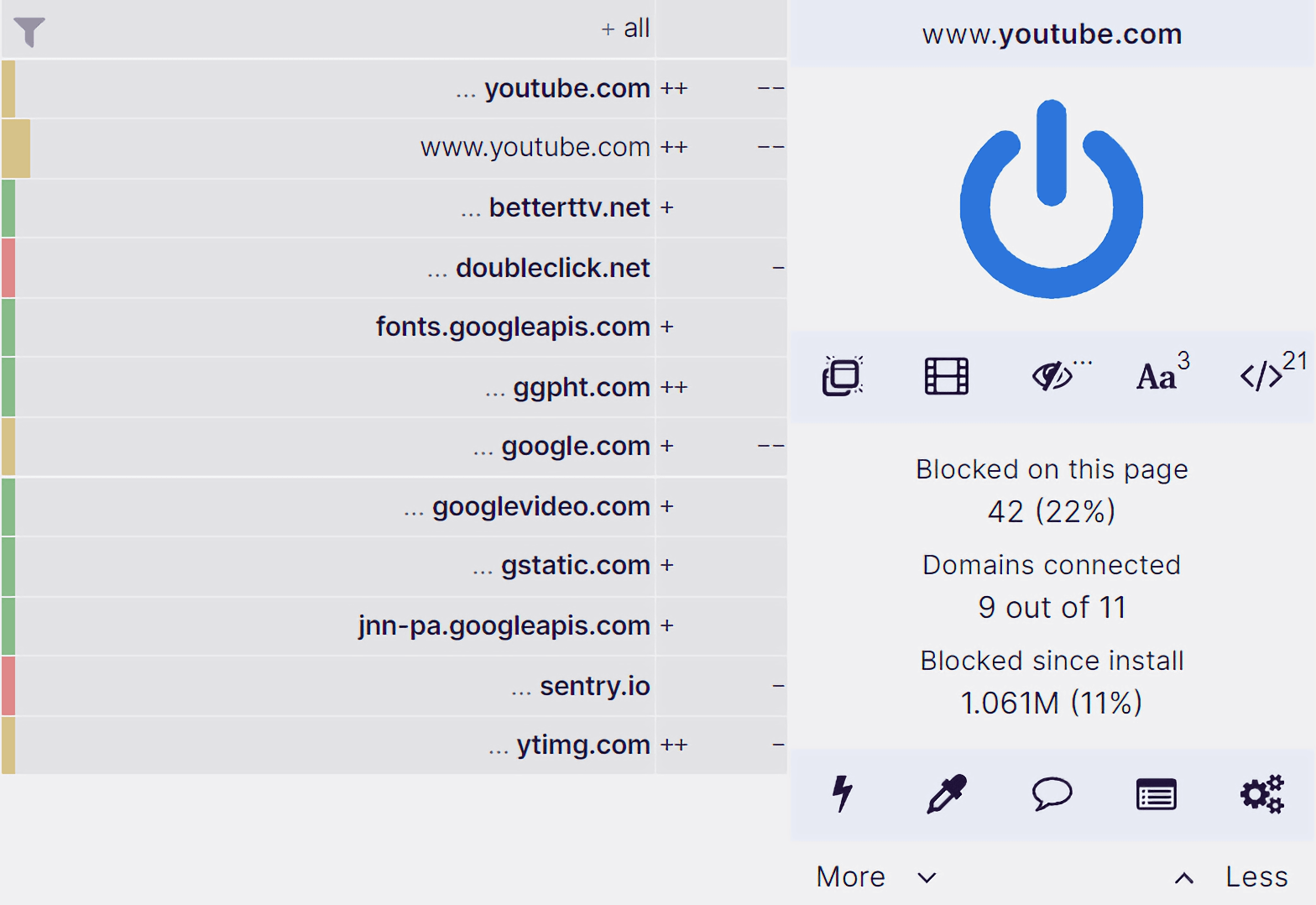
The uBlock Origin dashboard provides a detailed logger to see every single network request, allowing for precise troubleshooting and blocking.
2025 Comparison: uBlock Origin vs. uBlock Origin Lite
With the full implementation of Manifest V3 in late 2025, Chrome users must now choose between the standard version and the “Lite” version.
Key Differences for Chrome/Edge Users (2025)
- uBlock Origin (Standard): Offers the full feature set but is now restricted or removed from the Chrome Web Store. It requires a browser like Firefox to function at 100%.
- uBlock Origin Lite: A Manifest V3-compliant version. It is faster and more secure but lacks “Advanced Mode,” dynamic filtering, and certain cosmetic filtering capabilities.
- The Recommendation: If you are a power user, switch to Firefox to keep the full power of uBlock Origin. If you must stay on Chrome, use uBlock Origin Lite for the best possible experience.
Despite these industry shifts, the core uBlock Origin project remains the most trusted name in the fight for a cleaner, faster, and more private web.
Expert Setup & Hardening Recommendations
Move beyond the default settings to achieve a truly professional security posture:
- Enable “Advanced User” Mode: Click the “Cogs” icon and check the “I am an advanced user” box. This unlocks the Dynamic Filtering matrix.
- Activate Annoyance Lists: Go to Filter Lists > Annoyances and enable AdGuard Annoyances and Fanboy’s Annoyances to kill cookie banners and “Chat” widgets.
- Block Remote Fonts: In the dashboard, check “Block remote fonts” to speed up page loads and prevent font-based fingerprinting.
- Utilize the Logger: If a site isn’t working, open the Logger (the “Eye” icon) to see exactly which blocked script is causing the issue.
- Strict Domain Blocking: For high-security browsing, enable Strict Domain Blocking to prevent the browser from even connecting to a known malicious domain’s root.
Who is uBlock Origin Best Suited For?
- Privacy Specialists: Users who want total visibility into every script and tracker attempting to load in their browser.
- Resource-Conscious Users: People with older hardware or laptops who need a lightweight solution that won’t drain their battery.
- Firefox Power Users: Individuals using Firefox, LibreWolf, or Waterfox who want the unrestricted version of the software.
- YouTube Viewers: Anyone tired of YouTube’s ad-blocker detection who needs a tool that updates its scripts daily.
Who Should Consider an Alternative?
- Mainstream Chrome Users: Due to Manifest V3, the original uBlock Origin is no longer the best fit for Chrome; use uBlock Origin Lite instead.
- Beginners wanting “Zero Work”: While the defaults are great, uBO can occasionally break sites if you start clicking in Advanced Mode without knowledge.
- Mobile Safari Users: uBlock Origin is not available for iOS Safari; users on Apple devices should look at AdGuard for iOS.
Top Content Blocker Alternatives
uBlock Origin Lite
Primary Strength: The official **Manifest V3** version for Chrome. It’s faster and more secure but has limited technical customization.
AdGuard
Primary Strength: Excellent **Cross-Platform** support including a system-wide app for Windows, Mac, and iOS that works outside the browser.
Brave Shields
Primary Strength: The best **Native Blocker**. Integrated directly into the Brave Browser, it offers uBO-level blocking without an extension.
Final Verdict: The Definitve Choice for the Free Web
/ 10.0
uBlock Origin remains the only content blocker we award a perfect score. In 2025, its commitment to user privacy, resource efficiency, and open-source transparency is more vital than ever. While the browser industry is changing to limit extension power, uBlock Origin on a privacy-respecting browser like Firefox is the single most effective tool you can use to reclaim your digital autonomy. It is, quite simply, the last line of defense for a clean internet experience.
Expert Security Conclusion
If you value your time, your hardware’s performance, and your personal data, uBlock Origin is not optional—it is essential.
Take Back Your Browser
Join millions of users who experience the web without the noise, the tracking, and the overhead.