
VeraCrypt Review 2025: Is It Still the Safest Disk Encryption?
VeraCrypt Review – The Definitive Open-Source Standard for Hard Drive Encryption & Plausible Deniability (2025)
VeraCrypt is the powerhouse successor to TrueCrypt, offering industrial-strength, open-source disk encryption for those who refuse to compromise on privacy. It specializes in creating encrypted containers, encrypting entire partitions, and offering unique Plausible Deniability features through hidden volumes and hidden operating systems. In 2025, it remains the elite choice for users seeking a transparent, audited alternative to closed-source tools like BitLocker.
VERIFIED DATA: VeraCrypt is fully open-source and has undergone extensive security audits (Quarkslab, OSTIF) to ensure it is free from backdoors. It utilizes XTS mode and high iterations of PBKDF2 (up to 500,000+) to thwart brute-force attacks more effectively than its predecessor.
VeraCrypt Performance Metrics: Technical Security Analysis
VeraCrypt isn’t just a basic lock; it’s a digital vault. By allowing users to stack encryption algorithms (cascading), it provides a level of security that is mathematically virtually unbreakable with current technology.
| Security Metric | VeraCrypt Capability | Technical Deep Dive & Expert Analysis |
|---|---|---|
| Encryption Ciphers | Supports single or multi-layered (cascaded) ciphers. If one algorithm were theoretically compromised, your data remains safe behind the others. | |
| Hash Algorithms | SHA-512, Whirlpool, BLAKE2s | Uses high iteration counts (PBKDF2) to make brute-forcing passwords significantly slower and more costly for attackers compared to legacy tools. |
| Plausible Deniability | Hidden Volumes & OS | Allows you to create a Hidden Volume inside an outer encrypted volume. Even if forced to give a password, you only reveal “decoy” data. |
| Platform Availability | Cross-Platform (Win/Mac/Linux) | One of the few tools that allow you to move an encrypted USB drive between Windows, Linux, and macOS without compatibility issues. |
| Boot Encryption | Full System Encryption (FDE) | Encrypts the entire Windows system partition, requiring a password before the OS even starts, preventing data access from physical theft. |
VeraCrypt Architecture: The Mechanics of Extreme Privacy
VeraCrypt operates on the principle of “On-The-Fly Encryption” (OTFE). Data is automatically encrypted right before it is saved and decrypted right after it is loaded, without any user intervention after the volume is mounted.
1. Plausible Deniability (Hidden Volumes)
The hallmark of VeraCrypt is the ability to maintain “Plausible Deniability.”
- The Decoy Concept: You create an outer volume with a “decoy” password. Inside that space, you create a hidden volume with a separate password.
- Mathematical Invisibility: There is no way to prove a hidden volume exists. The free space in the outer volume looks like random data, which is exactly what an unmounted hidden volume looks like.
- Hidden OS: For extreme cases, VeraCrypt can boot a hidden operating system that is entirely separate from your primary OS, providing a “panic” environment.
2. Advanced Key Derivation
VeraCrypt is significantly more resistant to “Brute Force” attacks than previous iterations of encryption software.
- PIM (Personal Iterations Multiplier): A unique feature that allows users to increase the number of iterations used during key derivation, making the software even harder to crack.
- RAM Encryption: Modern versions (1.24+) include features to protect encryption keys in memory from “Cold Boot” attacks by encrypting the keys themselves.
3. Open-Source Transparency
Unlike BitLocker (Microsoft) or FileVault (Apple), VeraCrypt’s code is public.
- Community Auditing: Security researchers globally inspect the code for “backdoors,” ensuring no government or entity has a master key.
- No Tracking: VeraCrypt does not phone home, require an account, or store keys in the cloud. It is purely local.
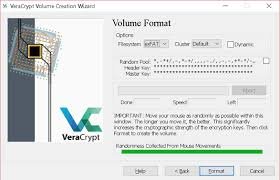
The VeraCrypt volume creation wizard, showing the multi-step process for creating encrypted containers and hidden volumes.
Setup & Configuration Recommendations for Maximum Security
VeraCrypt is a professional-grade tool. To use it correctly in 2025, follow these expert guidelines:
- Create a Rescue Disk: If you are encrypting your system drive, VeraCrypt *requires* you to create a rescue disk. This is your only way back if the bootloader is damaged.
- Use a Strong PIM: While it makes mounting slightly slower, using a custom PIM value significantly increases the security of your volume header.
- Select AES-NI Hardware Acceleration: Ensure your CPU supports AES-NI (most modern ones do) to prevent the encryption from slowing down your system.
- Encrypt Your Swap/Page File: If you aren’t using Full Disk Encryption, ensure Windows isn’t “leaking” your decrypted data into the page file on your hard drive.
Who is VeraCrypt Best Suited For?
- Privacy Purists: Users who do not trust closed-source software from big tech companies.
- Journalists & Activists: Those who may face physical seizure of their devices and require plausible deniability.
- Power Users: Individuals who want granular control over encryption algorithms and hash functions.
- Cross-Platform Workers: Anyone needing to access the same encrypted data on Windows, Mac, and Linux seamlessly.
Potential Drawbacks to Consider
- Steep Learning Curve: The interface is functional but dated, and the options can be overwhelming for non-technical users.
- No Password Recovery: If you lose your password or keyfile, your data is gone forever. There is no recovery backdoor.
- Manual Management: Unlike BitLocker, you usually have to manually mount and dismount your containers.
VeraCrypt vs. Native Alternatives
BitLocker
Primary Strength: Best for ease of use on Windows Pro. Integrates with TPM chips for seamless, transparent encryption without a boot password.
Cryptomator
Primary Strength: Best for Cloud Storage (Dropbox/OneDrive). It encrypts individual files rather than a whole disk, making it sync-friendly.
FileVault 2
Primary Strength: The native choice for macOS. It offers hardware-level integration with Apple’s T2/M-series chips for zero-latency encryption.
Final Verdict: The Unrivaled King of Open-Source Encryption
/ 10.0
VeraCrypt remains the most powerful and trustworthy encryption tool available to the public. While it lacks the “slick” UI of modern SaaS apps, its technical robustness and audited, open-source nature make it the gold standard for anyone serious about local data security. If you need plausible deniability or cross-platform flexibility, there is simply no better option.
Conclusion
For those who prioritize transparency and total control over their data, VeraCrypt is indispensable. It is the only tool that bridges the gap between high-end security research and daily usability.
Protect Your Data with VeraCrypt
Take control of your digital privacy with the world’s most trusted open-source disk encryption software.