
AxCrypt Review 2025: Is It the Best File Encryption for Cloud Users?
AxCrypt Review – The Industry Standard for Seamless Individual File Encryption & Cloud Security (2025-2026)
AxCrypt is the world’s most popular file encryption software, designed for users who need to secure specific documents without the complexity of full-disk encryption. By utilizing AES-256 bit encryption and integrating directly into Windows and macOS file explorers, AxCrypt allows you to protect, share, and store sensitive data in the cloud with a single click. In 2025, it remains the definitive choice for professionals, lawyers, and remote workers who require granular security for individual PDFs, spreadsheets, and private folders.
VERIFIED DATA: AxCrypt is a Swedish-based security solution with over 20 million downloads. It is GDPR and HIPAA compliant, making it a trusted tool for legal and medical industries. Unlike many competitors, AxCrypt includes a Cloud Storage Awareness feature that automatically detects and secures folders in Dropbox, Google Drive, and OneDrive.
AxCrypt Performance Metrics: Granular Security Analysis
While tools like VeraCrypt focus on “Total Drive Lockdown,” AxCrypt is built for the Modern Cloud Workflow. It ensures that even if your cloud account is hacked, your files remain unreadable.
| Security Metric | AxCrypt Premium Capability | Technical Deep Dive & Expert Analysis |
|---|---|---|
| Encryption Standard | The gold standard for encryption. Used by governments and banks worldwide. AES-128 is available for free users. | |
| Cloud Integration | Native Auto-Detection | Automatically recognizes OneDrive, Google Drive, and Dropbox folders to ensure files are encrypted before syncing. |
| Key Sharing | Secure Recipient Access | Unique feature allowing you to share encrypted files with others. Recipients use their own AxCrypt account to decrypt without seeing your master password. |
| Mobile Accessibility | iOS & Android Apps | Allows you to view and decrypt your secured files directly on mobile devices via integration with cloud storage providers. |
| Password Manager | Built-in Secure Vault | Includes a secondary secure vault for storing passwords and sensitive notes, protected by the same master encryption key. |
Technical Deep Dive: Why AxCrypt is the Leader in File-Level Security
To appreciate the value of AxCrypt, one must understand the vulnerability of modern cloud storage. While providers like Google Drive encrypt data “at rest,” they hold the keys. AxCrypt implements Zero-Knowledge Security at the file level, meaning only you possess the decryption capability.
1. The “Single File” vs. “Disk Image” Philosophy
For many users, VeraCrypt is overkill. If you only need to protect a few hundred PDFs or a folder of tax documents, creating a multi-gigabyte virtual disk is inefficient. AxCrypt operates on a per-file basis.
- Reduced Overhead: Because it doesn’t create a large container, it doesn’t waste disk space or system resources.
- Sync-Friendliness: Cloud services only upload the specific file you changed. In a container-based system (like VeraCrypt), even a 1KB change requires re-uploading the entire massive container.
- Transparent Working: You double-click a file, AxCrypt asks for your password, the file opens in its native app (like Word or Excel), and it re-encrypts automatically when you close it.
2. AES-256 Bit Encryption & Security Architecture
AxCrypt uses the Advanced Encryption Standard (AES) with 256-bit keys. To put this in perspective, it would take a modern supercomputer billions of years to brute-force a single file.
In 2025, AxCrypt has further hardened its architecture to include brute-force protection and memory-only key storage. This ensures that even if an attacker gains physical access to your running PC, extracting the decryption keys from the RAM is exceptionally difficult.
3. Secure Key Sharing: The Collaboration Game-Changer
The biggest historical weakness of encryption was sharing. Typically, you had to share your password with the recipient—a major security risk. AxCrypt’s Key Sharing feature solves this:
- Public Key Infrastructure: AxCrypt uses public-key cryptography to allow you to “add” a recipient to a file.
- Identity-Based Access: The recipient logs into their own AxCrypt account. Their unique private key unlocks the file you shared. You never have to disclose your password.
- Revocable Access: If you no longer want a recipient to have access, you can revoke their permission from the file header.
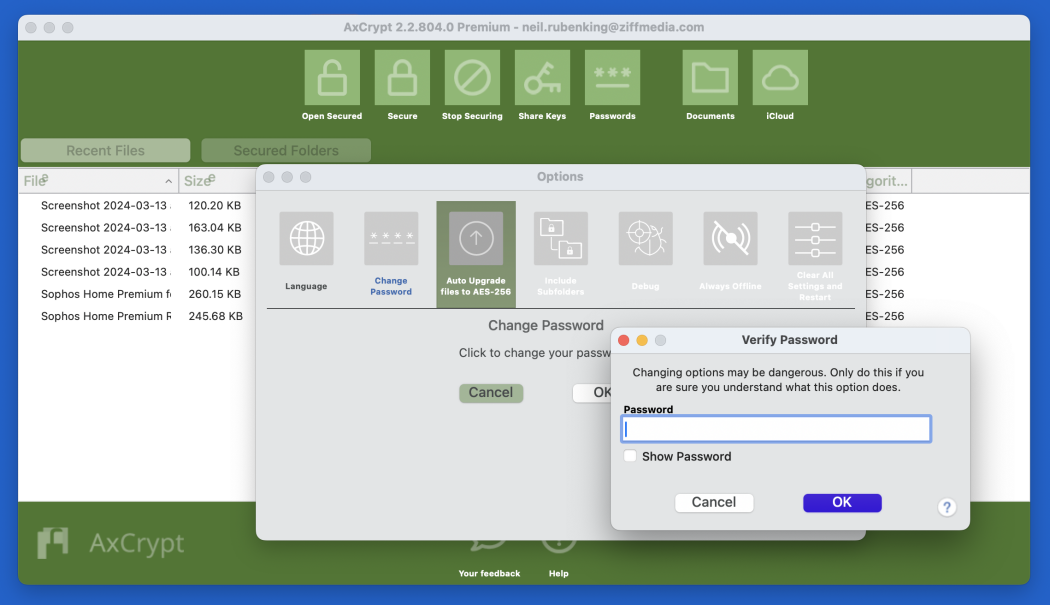
The AxCrypt desktop interface: Clean, intuitive, and designed to manage thousands of encrypted files with ease.
AxCrypt in 2025: Advanced Features for Professional Use
The software has evolved significantly, adding features that cater to enterprise-level security needs while maintaining a consumer-friendly UI.
Automatic Cloud Awareness
AxCrypt automatically detects if you have cloud sync clients installed. It creates a dedicated “AxCrypt” folder within your Google Drive or Dropbox. Any file dropped into these folders is instantly encrypted locally before it hits the cloud server. This prevents the “Cloud Provider Leak” scenario where a provider’s internal employee or a government subpoena could expose your data.
Password Management & File Shredding
Beyond encryption, AxCrypt provides a Secure File Shredder. When you delete a sensitive document, Windows normally leaves “ghost” data on the drive. AxCrypt’s shredder overwrites the physical sectors of the disk, ensuring forensic recovery is impossible. Additionally, the built-in password manager allows you to keep your master credentials and digital keys in one secure location.
Comparison: AxCrypt vs. VeraCrypt vs. Cryptomator
VeraCrypt
Primary Strength: Best for “All-or-Nothing” security. It encrypts entire hard drives or huge partitions. Better for: High-risk users who need plausible deniability.
Cryptomator
Primary Strength: Best for “Folder-level” cloud encryption. It’s open-source and free for desktop. Better for: Users on a budget who prefer open-source audits.
NordLocker
Primary Strength: Part of the Nord Security suite. Offers a very modern UI and cloud-native “lockers.” Better for: Users who already use NordVPN.
Expert Setup & Optimization Guide
To ensure your AxCrypt installation is as secure as possible, we recommend the following expert configurations:
- Use a 12+ Character Passphrase: Encryption is only as strong as the password. Use a combination of symbols, numbers, and case-sensitive letters.
- Enable “Inactivity Auto-Sign Out”: Go to settings and set AxCrypt to sign out after 10 minutes of inactivity. This prevents someone from accessing your files if you walk away from your desk.
- Backup Your Account Key: AxCrypt uses an “Account Key.” If you lose access to your email or the AxCrypt servers go down, having a physical backup of your account key is your only way to recover data.
- Clean Your Temporary Files: Even with encryption, some apps create “Temp” versions of files. Use a tool like CCleaner regularly to ensure no unencrypted fragments remain.
- Use the “Anonymous File Names” Feature: (Premium) This feature encrypts the names of your files as well as the content, so an attacker won’t even know if a file is titled “TaxReturn.pdf” or “FamilyPhoto.jpg.”
Pros & Cons: Is AxCrypt Right for You?
The Pros
- Ease of Use: The most user-friendly encryption tool on the market.
- Right-Click Integration: Encrypt any file instantly from your desktop.
- Collaborative: Key sharing is a unique and powerful professional feature.
- Lightweight: Zero impact on system boot times or performance.
The Cons
- Subscription Model: Most powerful features (AES-256) require a paid monthly/yearly plan.
- Not Open Source: Unlike VeraCrypt, the code is proprietary, which may worry ultra-privacy purists.
- Account Dependent: Requires an internet connection for initial setup and account verification.
Final Verdict: The Best Encryption for Modern Document Workflows
/ 10.0
AxCrypt is an exceptional tool for the 2025 digital landscape. It bridges the gap between high-level cryptography and daily usability. While it doesn’t offer the “Total System” protection of Tails OS or VeraCrypt, it is the absolute king of file-level security. For business professionals, remote workers, and anyone who stores sensitive PDFs in the cloud, AxCrypt is an essential layer of defense.
Cybersecurity Conclusion
In an era where data breaches are a matter of “when” not “if,” encrypting your most sensitive files individually is the smartest move you can make. AxCrypt makes this process so simple that there is no longer an excuse for leaving your documents exposed.
Secure Your Digital Life Today
Don’t wait for a data breach. Download AxCrypt and encrypt your first file in under 60 seconds.