
Acronis True Image Review 2025: The Ultimate Integrated Backup & Security

Acronis True Image Review – The Definitive All-in-One Solution for AI-Driven Backup and Anti-Ransomware Defense (2025-2026)
Acronis True Image (recently rebranded back from Acronis Cyber Protect Home Office) is the world’s most advanced personal backup solution, pioneered by the belief that backup alone is no longer enough in an age of sophisticated malware. By natively integrating AI-powered behavioral heuristics with sector-level disk imaging, Acronis provides a “dual-shield” architecture that not only preserves your data but actively defends it from infiltration. In 2025, the platform features a revolutionary malware-free recovery engine, ensuring that every byte restored to your system is scanned and verified against the latest 2026 threat signatures. Whether you are a creative professional protecting terabytes of work or a home office user securing critical financial data, Acronis True Image delivers the speed, security, and peace of mind that traditional, siloed backup tools cannot match.
VERIFIED DATA: Acronis is a global leader in cyber protection, used by over 5.5 million individuals and 500,000 businesses. In 2025, the platform achieved 100% detection rates in independent AV-TEST evaluations for ransomware protection. The 2025 release reintroduced the perpetual license option alongside subscription models, catering to long-term users who demand data sovereignty without recurring fees. Its “Active Protection” technology has successfully prevented over one million ransomware attacks to date.
Integrated Defense Architecture: 2025 Technical Metrics
Acronis True Image is built on the principle of Cyber Protection, which combines data safety (backup) with data security (anti-malware). This synergy eliminates the gaps left by using separate vendors.
| Capability Metric | Acronis 2025 Standard | Expert Technical Analysis (2025-2026) |
|---|---|---|
| Backup Technology | Captures everything: OS, apps, settings, and files. Utilizes Acronis Universal Restore for migration to dissimilar hardware. | |
| Ransomware Defense | Behavioral Heuristics (AI) | The “Active Protection” engine monitors file patterns. If unauthorized encryption starts, it terminates the process and restores files instantly. |
| Recovery Verification | Pre-Restore Malware Scan | Unique for 2025: Automatically scans backup archives for dormant malware before restoration to prevent “reinfection loops.” |
| Cloud Integration | Dual-Protection (Local + Cloud) | Allows for simultaneous backup to local drives and the Acronis Cyber Cloud, adhering to the 3-2-1 backup rule. |
| System Performance | Low-Impact Engine | Optimized for 2025 to run on 4GB RAM systems without significant CPU throttling, even during full-system antivirus scans. |
Deep Dive: The Evolution of “True” Protection in 2025
In the 2025-2026 digital era, attackers target backups first to ensure their victims have no choice but to pay the ransom. Acronis True Image addresses this specific threat through its Self-Defense module, which prevents unauthorized modifications to the backup files themselves.
1. AI-Powered Active Protection: Real-Time Behavioral Guard
While traditional antivirus tools rely on databases of known signatures, Acronis uses Advanced Artificial Intelligence to identify “suspicious behavior.”
- Zero-Day Detection: By analyzing how applications interact with the file system, Acronis can stop never-before-seen ransomware variants before they can do damage.
- Automated Self-Healing: If the AI detects an attack, it doesn’t just block it—it uses its temporary cache to automatically restore any files that were altered in the few milliseconds before the block occurred.
- Anti-Cryptojacking: Included in the 2025 suite, this prevents malicious actors from hijacking your CPU/GPU resources to mine cryptocurrency, preserving your machine’s performance.
2. Malware-Free Recovery: Breaking the Cycle of Reinfection
One of the most dangerous scenarios in modern forensics is the “dormant threat.” Malware can sit in a backup for months, waiting to be restored so it can re-encrypt the system.
Acronis True Image 2025 introduces a “Clean Restore” protocol. When you initiate a recovery, the software uses its integrated security engine to scan the backup archive using the most current 2026 definitions. If a threat is found, it is quarantined *before* the files touch your hard drive. This Safe Recovery ensures that your journey back to a working state isn’t a shortcut to another disaster.
3. Hybrid Cloud Power & Universal Restore
Data sovereignty is a primary concern for 2025 users. Acronis gives you total control over where your data resides.
- Acronis Universal Restore: If your computer dies and you buy a new one with a completely different CPU or motherboard, Acronis can inject the necessary drivers to ensure your old system boots on the new hardware.
- End-to-End Encryption: Backups are protected by AES-256 encryption both in transit and at rest in the cloud. Even Acronis employees cannot see your data.
- Blockchain Notarization: For professional users, the Acronis Notary feature uses blockchain technology to verify that a file has not been tampered with since it was backed up, essential for legal and forensic compliance.
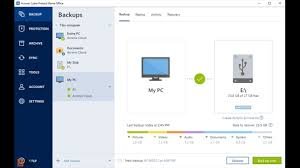
The Acronis True Image 2025 Interface: Reclaiming the classic name with a modern, high-speed unified console.
Expert Setup: Configuring a Fortified Backup Strategy
To maximize your protection in 2025-2026, you must configure Acronis beyond the “out-of-the-box” settings. Follow this specialist workflow:
- Implement the 3-2-1 Strategy: Set up a “Non-Stop Backup” to a local NAS or external drive, and a “Daily Full Image” to the Acronis Cloud. This ensures you are protected from both local hardware failure and total site disasters.
- Enable “Vulnerability Assessment”: Run the built-in scanner weekly. It identifies unpatched software (like old versions of Chrome or Zoom) that attackers use as entry points.
- Activate “Full Scan” on Recovery: In the recovery settings, ensure the option to scan backups for malware is toggled “ON.”
- Use Acronis Notary for Sensitive Files: If you are a business user or freelancer, enable blockchain notarization for your contracts and financial folders to ensure 100% data integrity.
- Configure a Bootable Media: Do not skip this step. Create an Acronis Survival Kit on a USB drive. If your Windows or macOS fails to boot, this drive will allow you to restore your entire system in minutes.
Who is Acronis True Image Best Suited For?
- High-Stakes Freelancers: Creative professionals who cannot afford a single hour of downtime or the loss of proprietary client work.
- Remote Home Offices: Users who lack a dedicated IT department and need a “set and forget” tool that handles both security and backup.
- Privacy-Conscious Users: Those who want the option of a perpetual license and local encryption keys.
- System Builders & Enthusiasts: Who frequently migrate between different hardware sets and need the reliability of Universal Restore.
Comparison: Acronis vs. Macrium Reflect vs. Backblaze
Macrium Reflect
Primary Strength: Unbeatable Rapid Delta Restore for local imaging. Weakness: Lacks integrated antivirus/anti-ransomware; no built-in cloud storage for personal users.
Backblaze
Primary Strength: Extremely simple, unlimited cloud backup for a low flat fee. Weakness: Lacks full-system imaging; you cannot restore your entire OS and apps to a new machine easily.
Veeam Agent (Free)
Primary Strength: Enterprise-grade reliability for individual workstations. Weakness: Lacks the consumer-friendly AI security features and integrated cloud ecosystem of Acronis.
Pros & Cons: The Honest Cyber Specialist’s Reality
The Pros
- Native Synergy: The only tool where the backup engine and security engine talk to each other.
- Reintroduced Perpetual License: A massive win for 2025 users who hate the “Subscription-Only” trend.
- Malware-Free Restores: Essential for preventing the re-infection of clean systems.
- Universal Portability: Move your entire digital life to any hardware with zero hassle.
The Cons
- Initial Setup Size: The Windows installer is approximately 1GB, making it a “heavy” application.
- Complexity: The sheer number of features (Sync, Archive, Clone, Backup, Security) can be overwhelming for beginners.
- Account Requirement: You must create an Acronis account to activate the software, even for local-only backups.
Final Verdict: The Most Robust Personal Defense Suite in Existence
/ 10.0
Acronis True Image 2025 is not just backup software; it is a digital insurance policy. By returning to its original name and re-embracing perpetual licensing, Acronis has listened to its core community while continuing to push the boundaries of AI-integrated security. In a world where ransomware is becoming an automated commodity, Acronis provides the only proactive defense that effectively bridges the gap between prevention and recovery. It is faster, smarter, and more integrated than any other tool in its class. If you value your data and your time, Acronis True Image is the most comprehensive tool you can use to protect your digital legacy in 2026.
Reclaim Your Digital Security
Don’t wait for the ransom note. Join over 5 million users who trust Acronis to defend their digital world.