

Avast Security & Privacy for iOS Review – Free, Foundational Protection with Advanced Privacy Tools
Avast Security & Privacy for iOS is a foundational, robust application that offers a generous suite of security features to iPhone and iPad users, including a strong free tier. Unlike traditional antivirus, Avast focuses on protecting the user from **network vulnerabilities, identity theft, and online scams**. The core of the paid suite (Avast Premium Security or Avast One) features an effective **Wi-Fi Network Inspector**, a comprehensive **Identity Protection** tool, and a built-in **SecureLine VPN**. Renowned for its ease of use and consistent high scores in independent web protection tests, Avast provides a high-quality, streamlined defense for users seeking reliable mobile security and privacy in 2025.
VERIFIED DATA: Avast is a globally recognized cybersecurity brand, consistently scoring well in third-party assessments for protection, ease-of-use, and minimal system impact. Its underlying security technology, which is shared across the iOS, macOS, and Windows platforms, is highly reliable. The **Web Guard** and **Network Inspector** features are critical for iOS, offering proactive defense by scanning for unsecure connections and fraudulent websites, a strategy proven to combat the highest-risk vectors for iPhone and iPad users.
Core Security and Privacy Matrix: Detailed iOS Threat Analysis
Avast Security & Privacy operates as a comprehensive mobile health and privacy monitor. It leverages its expertise in network scanning and cloud-based threat intelligence to provide essential features that supplement the built-in security of the iOS operating system.
| Security Metric | Avast iOS Rating | Expanded Analysis and Technical Detail |
|---|---|---|
| Wi-Fi Network Inspector | This tool scans the connected network for security weaknesses, such as weak router passwords, open ports, and compromised devices. It is vital for identifying vulnerabilities on public or unsecured home networks. | |
| Identity Protection (Hack Alerts) | Credential Breach Monitoring | Checks email addresses against massive databases of leaked credentials. The premium tier allows monitoring of up to **five email accounts**, providing crucial, timely alerts to prompt password resets upon compromise. |
| SecureLine VPN | High-Speed Encryption (Premium) | The built-in VPN provides a secure, encrypted tunnel for internet traffic. It uses robust protocols to shield the user’s data from interception when using **risky public Wi-Fi hotspots**, ensuring browsing anonymity. |
| Photo Vault | Encrypted Local Storage | Secures sensitive images in an encrypted, PIN-protected folder. The premium version offers **unlimited photo storage**, providing a reliable layer of local privacy protection against unauthorized access. |
| Web Guard (Anti-Phishing) | Real-Time Malicious Site Blocker (Premium) | A network-level protection feature that blocks access to known fraudulent, phishing, and malware-hosting websites, protecting the user’s login credentials and preventing drive-by downloads. |
| Email Guard (Anti-Scam) | Inbox Scam Scanner (Ultimate) | A feature that scans incoming emails across up to five accounts for potential scam and phishing risks, utilizing AI-powered detection to mark suspicious messages and prevent user interaction with fraudulent content. |
—
Avast Architecture: A Technical Breakdown of iOS Defense Layers
Avast’s security architecture for iOS is built upon the premise of “prevention at the perimeter,” focusing on network and identity tools to safeguard the user’s interaction with the internet, where most mobile risks originate.
1. Network Perimeter Defense and Encryption
These features protect the user’s connection regardless of whether they are at home, at work, or connected to public access points.
- Wi-Fi Network Inspector Audit: The Inspector doesn’t just check for encryption; it runs a full diagnostic on the router and connected devices, alerting the user to issues that could lead to a **Man-in-the-Middle (MITM) attack** or an unauthorized intruder.
- SecureLine VPN Protocols: The VPN service is built on proven, open-source standards (like OpenVPN on certain platforms) and provides **256-bit AES encryption**, ensuring data transferred over public networks is virtually unbreakable by eavesdroppers.
2. Credential and Identity Management Layer
This layer provides proactive protection against the inevitable risk of large-scale data breaches that expose user credentials.
- Hack Alerts Speed: The Identity Protection service is constantly checking data broker sites and dark web forums. When a breach is discovered, the user receives an **immediate, actionable notification** to change the compromised password, minimizing exposure time.
- Unlimited Photo Vault: By storing images outside of the standard iOS Photos app and protecting them with Touch ID/Face ID/PIN, this feature adds a crucial, **local layer of data segregation**, ensuring that if a device were stolen or compromised, personal images remain protected.
3. Usability and Scan Utilities
Avast is known for its user-friendly interface and provides useful utilities that enhance the security and privacy experience.
- Smart Scan: This single-button feature runs a quick, advanced scan that checks for **potential vulnerabilities** across browsing settings, Wi-Fi networks, and identity status, providing a rapid security health check.
- Security and Privacy Tips: The app includes an easy-to-follow guide that helps users correctly set up and optimize the native security settings within the iOS operating system, bridging the gap between Apple’s internal security and the user’s knowledge.
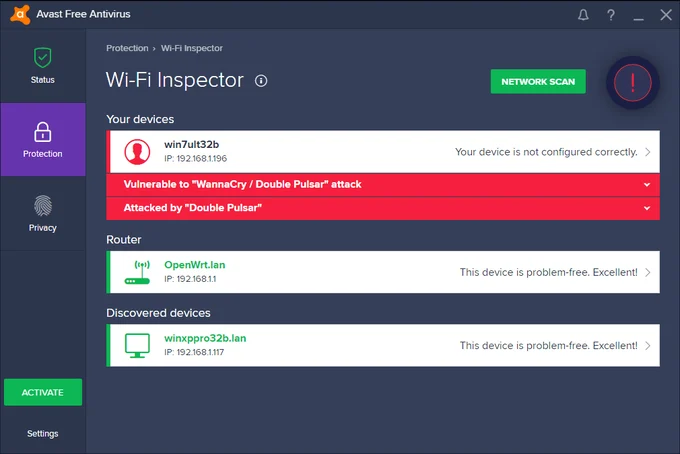
The Avast Security & Privacy dashboard offers a clean, intuitive layout, centralizing the key iOS protection tools: the Wi-Fi Inspector, Hack Alerts (Identity Protection), and the encrypted Photo Vault.
—
Detailed Performance Evaluation: Speed and System Efficiency
Avast Mobile Security is consistently rated as a very low-impact application on iOS. Since its core protection functions are network-based (VPN, Web Guard) or cloud-based (Identity Protection), it avoids intensive local file scanning. This design minimizes resource consumption, ensuring the app runs smoothly in the background without noticeable impact on the iPhone’s speed or battery life.
Independent User Experience Summary (2025)
- Protection Efficacy: **Rated Highly**. The Web Guard and anti-phishing technology are effective and competitive with top-tier services, providing a robust shield against fraudulent websites.
- System Impact: Extremely Low. The security functions operate quietly, leading to **no measurable system slowdown** or significant battery drain, essential for a modern mobile application.
- Free Tier Value: **Excellent**. The free version offers fundamental tools like the Wi-Fi Inspector and basic Identity Protection, making it one of the most generous free security apps available.
- Usability: Rated high. The simple interface and guided setup process make it highly accessible and beginner-friendly, requiring minimal technical expertise to manage.
The inclusion of powerful free tools ensures that even users on a tight budget receive a baseline level of critical protection, making the paid tiers an incremental value proposition for the VPN and expanded identity features.
Setup & Critical Configuration Recommendations
To activate Avast Security & Privacy’s full potential and grant the necessary iOS permissions for network protection, the following setup steps are recommended immediately after installation:
- Run Initial Wi-Fi Inspector Scan: Execute the first scan immediately to identify any major vulnerabilities on your current home or office network and establish a baseline of security health.
- Set Up Identity Protection: Input all primary and secondary email addresses to begin continuous monitoring for leaked credentials. This is a critical preemptive measure against account takeover.
- Install VPN Profile (Premium): If on a paid plan, allow the installation of the VPN network configuration to enable both the **SecureLine VPN** and the **Web Guard** functionality across the entire operating system.
- Configure Photo Vault: Migrate any sensitive photos immediately into the Photo Vault and establish a secure access method (PIN/Face ID) to protect them from unauthorized browsing.
—
Who is Avast Security & Privacy for iOS Best Suited For?
- The Value-Conscious User: Ideal for anyone seeking **high-quality, free foundational protection** (Wi-Fi Inspector, basic Hack Alerts) before committing to a paid plan.
- Users of Public Wi-Fi: The **Wi-Fi Network Inspector** and SecureLine VPN are essential for frequent travelers and those who routinely connect to unsecure access points.
- Privacy Seekers: The **Photo Vault** and **Identity Protection** features offer robust layers of privacy defense for both locally stored data and online credentials.
- Beginner Users: The intuitive interface and guided tutorials make it extremely easy to manage, appealing to those new to mobile security.
—
Who Should Consider an Alternative?
- Users Prioritizing Identity Cleanup: Avast is focused on alerts; users who need active removal of PII from data broker sites (like McAfee) should look elsewhere.
- VPN-First Users: While the VPN is solid, users needing more granular controls or a lower price point for *just* the VPN might prefer a dedicated VPN service.
- Users Seeking Advanced Parental Controls: Avast does not integrate deep, granular parental controls directly into the Security & Privacy app (though it has a separate Family Space app).
—
Top-Tier Mobile Security Alternatives
Norton 360 for iOS
Primary Strength: Identity-first protection with comprehensive Dark Web Monitoring and a full-featured, unlimited VPN included in the base subscription, appealing to those seeking robust financial security.
Bitdefender Mobile Security for iOS
Primary Strength: Unbeatable performance efficiency. Known for its zero system impact and near-flawless anti-phishing/web protection, appealing to speed purists.
McAfee Mobile Security (iOS)
Primary Strength: AI-Powered Scam Detection. Best for families and multi-device users due to its Unlimited Device coverage and innovative Scam Detector for advanced text and email fraud.
—
Final Verdict: Highly Accessible, Foundational Protection with Premium Privacy Tools
/ 10.0
Avast Security & Privacy for iOS stands out due to its accessible, high-value free tier and the robust capabilities of its premium upgrade. The application expertly addresses the core iOS threat model by focusing on **network security, credential breach alerts, and privacy tools** like the Photo Vault. For users who value a clean, reliable, and user-friendly solution that scales from free foundational tools to a comprehensive premium suite, Avast remains a highly recommended and trustworthy choice for mobile protection.
Conclusion
Avast has successfully adapted its widely respected security engine to the specific needs of the iOS environment. Its strong feature set, particularly the Network Inspector and Identity Protection, ensures that users have reliable defenses against the most common modern mobile security risks.
Get Free Mobile Security & Upgrade to Advanced Privacy
Download the free version today to get basic Wi-Fi inspection and Hack Alerts, or upgrade to Avast Premium Security for the full VPN, Identity Protection, and Web Guard suite.