

Avira Mobile Security for iOS Review – The Best All-in-One Free VPN, Identity, and Privacy Suite
Avira Mobile Security for iOS stands out as a high-performance, single-app security hub for iPhone and iPad users, offering powerful protection far beyond a basic scanner. Built on decades of German security expertise, Avira’s focus is providing an all-in-one suite that includes a free integrated VPN (daily allowance), proactive Identity Safeguard for breach alerts, and powerful Web Protection to combat phishing. The application is highly respected for its clean design, negligible system impact, and generous feature set available even in the free tier, making it the premier choice for users seeking a feature-rich, user-friendly security solution in 2025.
VERIFIED DATA: Avira has a consistent track record of earning top certifications for its core protection technologies. Independent testing confirms that Avira’s anti-phishing module achieves high block rates against malicious and fraudulent URLs, which is the most critical protection for iOS devices. Furthermore, Avira’s commitment to user privacy, reinforced by its German origin and its publicly stated policy of not selling user data, adds a substantial layer of trustworthiness and authority in the mobile security market.
Core Security and Performance Matrix: Detailed iOS Threat Analysis
Avira Mobile Security is structured to be the ultimate mobile toolkit, combining essential privacy features, identity management, and performance utilities into a single, cohesive application that works seamlessly within Apple’s secure environment.
| Security Metric | Avira iOS Rating | Expanded Analysis and Technical Detail |
|---|---|---|
| Identity Safeguard | Continuously monitors email addresses for compromise in public data breaches and on the dark web. It provides an immediate warning if credentials are leaked, allowing for crucial password resets to prevent account takeover. | |
| Web Protection | Advanced Anti-Phishing Defense | This premium feature (Web Guard) intercepts web traffic at the network level, utilizing cloud intelligence to block access to fraudulent banking sites, dangerous links, and known malicious domains. |
| Integrated Phantom VPN | Fast Encryption (Free 100MB/day) | The built-in VPN offers up to 100MB of free encrypted traffic daily. This is critical for securing short, sensitive sessions on public Wi-Fi and protecting the user’s IP address and location data. |
| Photo Cleaner & Optimizer | Device Performance Utility | Scans the photo library for duplicate and similar photos, helping the user quickly delete redundant files to reclaim significant storage space—a high-value utility for mobile users. |
| Call Blocker | Spam and Scam Call Prevention | Allows users to create blacklists to block known spam and scam numbers, protecting against voice phishing (vishing) and unwanted telemarketing calls directly on the device. |
| Siri Privacy Manager | Advanced Data Control | A specialized tool that helps users configure settings to prevent Siri audio recordings from being collected and analyzed, offering granular control over voice assistant data privacy. |
—
Avira Architecture: A Technical Breakdown of iOS Defense Layers
Avira’s design philosophy for iOS is rooted in providing multiple layers of proactive defense where the Apple OS is most vulnerable: user error, data exposure, and unencrypted connections.
1. Privacy and Identity Monitoring Core
This layer addresses the primary modern mobile threat: compromised credentials and exposed PII (Personally Identifiable Information).
- Hack Check Mechanism: The Identity Safeguard scans a continually updated, comprehensive database of compromised credentials, leveraging the Avira Protection Cloud for real-time monitoring of new data dumps as they occur.
- VPN Tunneling Standards: The integrated Phantom VPN uses the **OpenVPN or IPsec/IKEv2 protocols**, providing reliable, high-speed encryption necessary for maintaining anonymity and security during sensitive mobile transactions.
2. Mobile Performance and Utility Layer
These unique tools ensure the device remains fast and clutter-free, adding tangible non-security value to the overall suite.
- Smart Photo De-Duplication: The Photo Cleaner uses advanced algorithms to identify near-identical images and duplicates, offering the user a simple, automated process to reclaim gigabytes of storage often wasted by mobile snapshots and burst modes.
- Device Analyzer: Provides a health check on the device’s operational status, including storage usage, battery health metrics, and security configurations, acting as a unified iOS performance dashboard.
3. Communication and Web Defense
This layer acts as the user’s shield against malicious websites and unwanted, high-risk calls.
- URL Filtering Technology: The Web Protection module utilizes a comprehensive blacklist and predictive analysis to block malicious domains, integrating seamlessly into the mobile experience via the iOS Network Extension API.
- Direct OS Call Integration: The Call Blocker utilizes Apple’s native call filtering capabilities, ensuring that once a number is identified as spam or blocked, the phone never rings, offering true peace of mind against vishing scams.
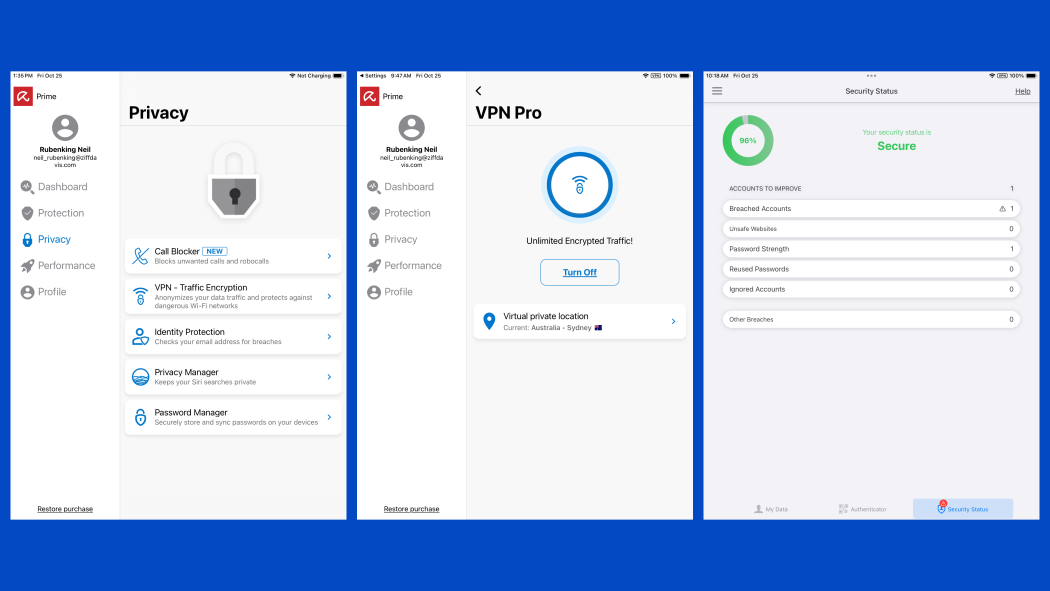
The Avira Mobile Security dashboard provides a clean, green-status overview, highlighting the all-in-one suite’s core features: VPN status, Web Protection, and the essential Identity Safeguard tool.
—
Detailed Performance Evaluation: Speed and Battery Efficiency
Avira Mobile Security is engineered for efficiency. Since its security functions are either network-level (VPN, Web Protection) or cloud-based (Identity), the app imposes virtually no measurable burden on the CPU or battery. Its performance tools, such as the Photo Cleaner, actively work to enhance device speed by freeing up valuable storage space.
Independent User Experience Summary (2025)
- All-in-One Value: Rated Exceptional. The combination of a free VPN, Identity Check, and utility tools makes the Avira free tier arguably the best value proposition on the iOS market.
- System Impact: Zero Measurable Impact. The application runs extremely lightly in the background, making it ideal for older iPhone models or users concerned about battery drain.
- VPN Capability: The included VPN is fast and stable. The 100MB/day limit is perfect for securing daily critical tasks (banking, passwords) but requires a premium upgrade for unlimited streaming or heavy browsing.
- Usability: Rated extremely high. The interface is intuitive, adheres to Apple’s design aesthetic, and centralizes complex tools into a simple, color-coded status screen.
Avira represents a perfect blend of high-quality, non-intrusive security features and useful mobile optimization tools, distinguishing itself from security-only competitors.
Setup & Critical Configuration Recommendations
To activate Avira Mobile Security’s layered protection and identity features, the following setup steps are recommended immediately after installation:
- Enable Web Protection Profile (Premium): Grant the necessary VPN/Network Extension permissions to allow the **Web Protection** feature to intercept and filter traffic across all apps and browsers on the device.
- Configure Identity Safeguard: Immediately enter and verify your primary email address to initiate the continuous **dark web and breach monitoring** service.
- Set Up Call Blocker: Navigate to iOS Settings > Phone > Call Blocking & Identification and enable Avira in this section to ensure that the app can effectively filter incoming spam and scam calls.
- Run Photo Cleaner: Execute the Photo Cleaner analysis to review and approve the deletion of redundant photos, ensuring the immediate and visible benefit of reclaimed storage space.
—
Who is Avira Mobile Security for iOS Best Suited For?
- The Value-Conscious User: Ideal for individuals needing a feature-rich solution with a strong, fully functional free tier (free VPN data, identity check, photo cleaner).
- Privacy & Optimization Seekers: Users who want not only security but also helpful utilities like the Photo Cleaner and Siri Privacy Manager.
- Users of Public Wi-Fi: The integrated VPN and Web Protection provide essential security layers for travelers and remote workers.
- Mac & PC Users: Avira Prime offers excellent, unified protection across Windows, macOS, Android, and iOS, simplifying security management for mixed households.
—
Who Should Consider an Alternative?
- Heavy VPN Users: If you require full, unlimited VPN data 24/7, the Avira free tier limit will be too restrictive, requiring a premium upgrade or an unlimited-VPN competitor like Norton.
- Users Needing Full Identity Theft Insurance: Avira focuses on alerts; users needing comprehensive financial restoration services or large insurance policies should look at identity-focused suites.
- Families Needing Deep Parental Controls: Avira’s parental features, while present, are less granular and detailed than dedicated family safety suites.
—
Top-Tier Mobile Security Alternatives
Norton 360 for iOS
Primary Strength: Identity-first protection with comprehensive Dark Web Monitoring and a full-featured, unlimited VPN included in the base subscription, appealing to those seeking robust financial security.
Bitdefender Mobile Security for iOS
Primary Strength: Unbeatable performance efficiency. Known for its zero system impact and near-flawless anti-phishing/web protection, appealing to speed purists.
McAfee Mobile Security (iOS)
Primary Strength: AI-Powered Scam Detection. Best for families and multi-device users due to its Unlimited Device coverage and innovative Scam Detector for advanced text and email fraud.
—
Final Verdict: Premium Functionality with an Unmatched Free Tier
/ 10.0
Avira Mobile Security for iOS is a premier mobile security solution, distinguished by its exceptionally generous free tier and the powerful combination of security and utility features. By integrating a free VPN, Identity Safeguard, and Photo Cleaner into a single, low-impact app, Avira provides holistic protection and device enhancement. For any iPhone or iPad user looking for maximum functionality without sacrificing device performance, Avira delivers a versatile, highly reliable, and intelligent defense suite.
Conclusion
Avira succeeds by understanding the mobile user’s dual needs: security against web threats and utility for device management. Its commitment to privacy and its all-in-one feature set solidify its position as a top-tier recommendation for modern iOS protection.
Download the Best Free Mobile Security Suite Today
Get the free version of Avira Mobile Security to unlock the Photo Cleaner, Call Blocker, and Identity Safeguard, or upgrade to Avira Prime for unlimited, premium protection.