

Kaspersky Premium for Mac Review – The Ultimate Full-Feature Security Suite
Kaspersky Premium for Mac is a top-tier, all-in-one security suite built for users who demand comprehensive protection that extends beyond basic antivirus. Consistently awarded “Best Security Solution for macOS” by independent labs, the Premium plan integrates flawless real-time malware defense with a wealth of premium tools. Key features include an unlimited, superfast VPN, a high-security Password Manager, and dedicated Online Payment Protection. It utilizes advanced AI-powered antivirus technology to ensure near-perfect detection without compromising the signature speed and low system impact expected from a modern Mac application.
VERIFIED DATA: Kaspersky consistently sets the bar for protection efficacy. In the 2023 AV-Test evaluations, it achieved the maximum 100% detection rate against macOS malware and earned the “Best Security Solution for macOS” award. It also performs exceptionally in identifying Windows threats that can spread through a Mac network, ensuring complete cross-platform security.
Core Security and Performance Matrix: Detailed Analysis
Kaspersky Premium transcends basic antivirus by packaging critical security, privacy, and performance tools into a single, cohesive platform. Its core engine relies on a massive threat intelligence network and machine learning algorithms.
| Security Metric | Kaspersky Rating | Expanded Analysis and Technical Detail |
|---|---|---|
| Mac Malware Detection | The engine uses a combination of Heuristic Analysis, Behavioral Modeling, and the cloud-based Kaspersky Security Network to detect zero-day and complex malware like Mac ransomware and crypto-miners. | |
| Online Financial Protection | Integrated Safe Money | The Safe Money feature automatically secures your browser environment when you visit banking or shopping sites. It blocks keyloggers, screen-scrapers, and unauthorized extensions to prevent theft during sensitive transactions. |
| VPN Service | Unlimited Premium VPN | Unlike many competitors that limit VPN data, the Premium plan includes a fast, unlimited-data VPN. It offers military-grade encryption for privacy on public Wi-Fi and bypasses geo-restrictions for content access. |
| System Impact | Low and Efficient | Despite its feature-rich nature, Kaspersky is highly optimized for macOS, scoring high marks in performance tests by AV-Test for having a minimal impact on everyday tasks like copying files or launching applications. |
| Privacy & Identity Tools | Full Suite Included | The Premium suite includes a Password Manager, Data Leak Checker (to scan for compromised accounts), and a webcam/mic blocker, providing a robust defense against privacy invasion and identity theft. |
| Parental Controls | Kaspersky Safe Kids (1 Year Free) | The Premium plan often includes a one-year subscription to the standalone Safe Kids app, which provides advanced monitoring, GPS tracking, and content filtering across multiple devices, a crucial feature for families. |
—
Kaspersky’s Advanced Architecture: A Technical Breakdown
Kaspersky’s success lies in its deep integration of threat intelligence gathered from millions of users worldwide, feeding its sophisticated detection engine.
1. AI-Powered Anti-Malware Engine
The core protection uses machine learning to identify polymorphic and fileless attacks, which traditional signature-based detection misses.
- Cloud-Assisted Threat Intelligence: Suspicious files are instantly cross-referenced with the massive, real-time updated Kaspersky Security Network (KSN), often neutralizing new threats within minutes of their appearance anywhere in the world.
- Cross-Platform Scanning: A unique benefit for Mac users on mixed-OS networks is Kaspersky’s ability to scan for, detect, and neutralize Windows-specific malware that might be stored harmlessly on the Mac but could infect a Windows PC or server when transferred.
2. Safe Money & Protected Browser
Securing your financial details requires protection that goes beyond typical phishing checks.
- Isolated Transactions: When the system detects you are visiting a known banking or payment site, it opens a special Protected Browser window. This hardened browser runs in a segregated environment, shielding it from malicious code running elsewhere on your Mac.
3. Network and Phishing Defense
The built-in Safe Browsing feature protects you from drive-by downloads and malicious scripts.
- URL Advisor: Provides a color-coded security rating next to search results and links, allowing you to instantly gauge the trustworthiness of a website before clicking.
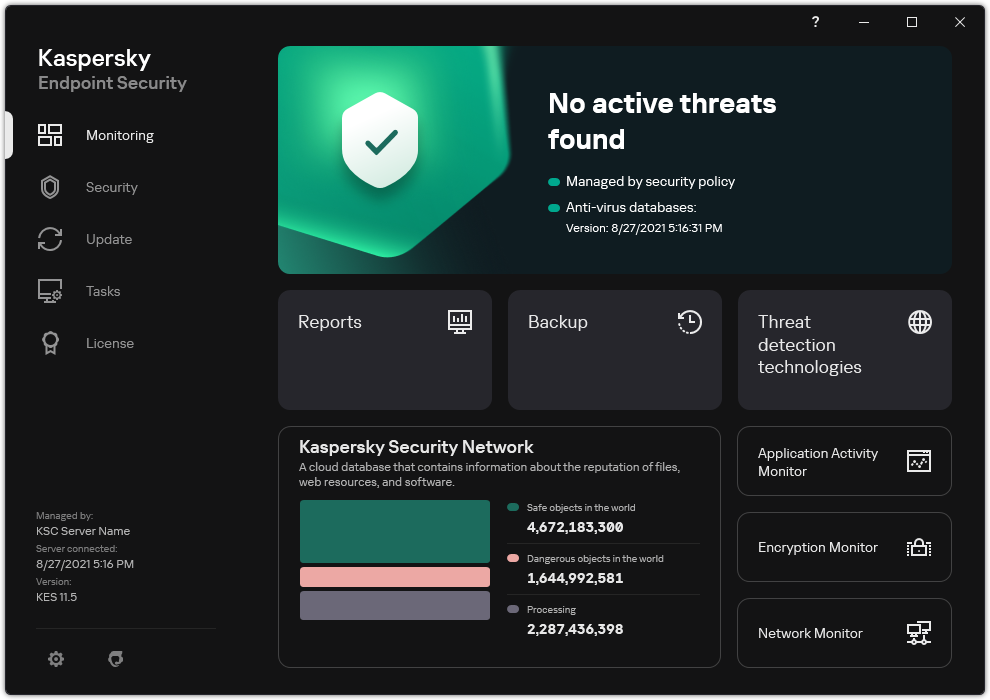
The Kaspersky interface is clean and organized, offering a centralized dashboard for managing Antivirus, Privacy (VPN, Webcam), and Identity tools like the Password Manager.
—
Detailed Performance Evaluation: Speed and Usability
Kaspersky’s reputation for heavy system usage is largely outdated. Modern versions are highly tuned for macOS, offering performance that rivals, and often beats, lighter competitors in formal testing.
Independent Lab Validation Summary (2023-2025)
- AV-Test Protection Score: 6.0/6.0 (Maximum). This perfect score indicates zero misses in their extensive malware and threat sample tests.
- AV-Test Performance Score: 6.0/6.0 (Maximum). This confirms minimal performance drag across key system activities like downloading, installing apps, and web browsing.
- EICAR Test Results: Pass (3/3). Successfully blocked all simulated malware, ensuring immediate defense upon file interaction.
- Usability: Zero False Positives recorded in recent testing, meaning it won’t mistakenly block legitimate software—a common issue with aggressive scanners.
The suite also includes Activity Monitoring and Performance Optimization tools that help manage application startup times and disk space, further boosting system speed.
Setup & Critical Configuration Recommendations
To leverage the full power of the Premium suite, pay close attention to the deep feature integration:
- Verify Full Disk Access: As with all modern macOS security tools, you must explicitly enable “Full Disk Access” in System Settings for the Real-Time Protection to function on all sensitive file paths.
- Configure Safe Money: Manually add the URLs of your most frequently used banking, investment, and e-commerce sites to the Safe Money section to ensure the Protected Browser launches automatically.
- Integrate Password Manager: Use the dedicated Kaspersky Password Manager and install its browser extension. This is separate from the antivirus but vital for true security and is included in the Premium plan.
- Run a Deep Full Scan: After installation, always run a full system scan. While real-time protection is immediate, a full scan guarantees the detection and removal of any lingering pre-existing threats.
—
Who is Kaspersky Premium Best Suited For?
- The All-in-One User: Individuals or families who want a single subscription to handle antivirus, VPN, password management, and parental controls across all devices (Mac, Windows, iOS, Android).
- Serious Online Shoppers & Bankers: The Safe Money feature provides one of the best forms of dedicated financial protection available, minimizing transaction risk.
- Multi-Device Households: The cross-platform protection and ability to detect Windows threats on a Mac make it ideal for homes with mixed operating systems.
- Privacy Enthusiasts: The inclusion of an unlimited, high-speed VPN and dedicated webcam/mic protection makes it a strong contender in the privacy sphere.
—
Who Should Consider an Alternative?
- The Pure Minimalist: If you only need lightweight malware cleanup and absolutely zero extra features, a tool like Malwarebytes might be a simpler fit.
- Users Needing a Deep Mac Cleanup Tool: While Kaspersky prevents malware, it focuses less on system “PUP” (Potentially Unwanted Program) cleanup than specialist tools like Malwarebytes.
- Custom Firewall Seekers: Kaspersky relies on its own Network Attack Blocker but does not offer the advanced, detailed two-way macOS firewall found in Intego NetBarrier.
—
Top-Tier Mac Security Alternatives
Intego Mac Internet Security X9
Primary Strength: Offers a Two-Way Firewall (NetBarrier) and deep Mac-centric optimization, ideal for users who prioritize Mac-specific network security.
Bitdefender Antivirus for Mac
Primary Strength: An excellent choice for pure antivirus performance and low system impact, often offering better initial pricing for its security features.
Malwarebytes Premium for Mac
Primary Strength: The best adware and PUP removal specialist. Perfect as a second-opinion tool or for users who want a lightweight, pure security focus.
—
Final Verdict: Setting the Benchmark for a Full Security Suite
/ 10.0
Kaspersky Premium for Mac is a near-perfect security solution for the modern, multi-device user. It secures a flawless reputation in malware protection while integrating vital premium features—most notably the unlimited VPN and Safe Money functionality—that elevate it beyond a simple antivirus. It is the gold standard for full-featured protection without the heavy performance penalties of legacy security suites.
Conclusion
Whether you use it as your primary defense or as a “special forces” cleaner alongside another tool, Malwarebytes Premium is an essential utility for maintaining a healthy, fast, and private Mac environment in 2025.
Secure Your Entire Digital Life
Upgrade to complete security, privacy, and performance protection for all your devices with Kaspersky Premium today.