
KeePassXC Review 2025: The Best Offline Local Password Manager
KeePassXC Review – The Definitive Offline Vault for Absolute Data Sovereignty (2025)
KeePassXC is the ultimate choice for privacy purists who refuse to trust the cloud with their sensitive credentials. As a community-driven, cross-platform fork of KeePass, it provides a local-only encryption environment where you, and only you, hold the keys to your database file. Utilizing the robust KDBX 4 format and modern Argon2id key derivation, it transforms your device into a fortified vault that is completely immune to server-side data breaches.
VERIFIED DATA: KeePassXC is fully open-source (GPL) and contains zero telemetry or tracking. Its security model relies on local execution, meaning your master password never touches the internet. In 2025, it remains the standard for air-gapped security, recommended by privacy experts worldwide for users seeking total data ownership.
Offline Security Metrics: Technical Performance
KeePassXC is built for maximum entropy and resistance against brute-force attacks. By keeping the database file (.kdbx) under your physical control, you eliminate the single point of failure inherent in cloud-based managers.
| Security Metric | KeePassXC Standards | Expert Technical Analysis |
|---|---|---|
| Primary Encryption | / ChaCha20 | Offers industry-leading ciphers. ChaCha20 is particularly efficient on modern processors, providing a high security margin with low performance overhead. |
| Key Derivation (KDF) | Argon2id (Standard) | KeePassXC utilizes Argon2id, the winner of the Password Hashing Competition, to make GPU-based brute-force attacks mathematically unfeasible. |
| Storage Model | Local KDBX 4 File | Your data lives in a single encrypted file. You can store it on an encrypted USB, a private NAS, or sync it manually via P2P tools like Syncthing. |
| Multi-Factor (MFA) | YubiKey / Key Files | Supports HMAC-SHA1 Challenge-Response with YubiKey. Access requires both “something you know” (password) and “something you have” (physical key). |
| Feature Set | TOTP & SSH Agent | Includes a built-in TOTP generator and an SSH Agent, allowing you to manage server keys directly from your encrypted vault. |
KeePassXC Architecture: Built for the Tech-Savvy
While other managers prioritize convenience, KeePassXC prioritizes system-level security and user control.
1. The KDBX 4.1 Format
The foundation of KeePassXC is the KDBX file format, designed to be portable and future-proof.
- Encrypted Metadata: Unlike older formats, KDBX 4 encrypts everything, including group names and custom icons, preventing any information leakage.
- Memory Protection: KeePassXC uses secure memory allocation to prevent your master password or decrypted secrets from being swapped to the disk.
- Customizable Workflows: You can define custom “Auto-Type” sequences to log into legacy desktop applications that don’t support traditional autofill.
2. Advanced Browser Integration
A bridge between your offline vault and your web browser that doesn’t compromise on the “offline-first” rule.
- Local Messaging: The KeePassXC-Browser extension communicates with the desktop app via an encrypted local socket. It never connects to an external server.
- Manual Confirmation: Every time a website requests a credential, the desktop app requires manual user approval, preventing silent data extraction.
- Passkey Support: In 2025, KeePassXC has expanded its Passkey integration, allowing you to store and use FIDO2 credentials directly from your local vault.
3. SSH Agent & Developer Tools
KeePassXC is the premier choice for developers and system administrators.
- SSH Key Management: Securely store your SSH Private Keys within the vault. KeePassXC can act as an agent, providing keys to your terminal only when the vault is unlocked.
- CLI Access: A powerful Command Line Interface allows for scripting and automated secret retrieval in secure environments.
- Database Reports: Built-in tools for Password Health and “Have I Been Pwned” checks (via local hash comparison) help you maintain vault integrity.
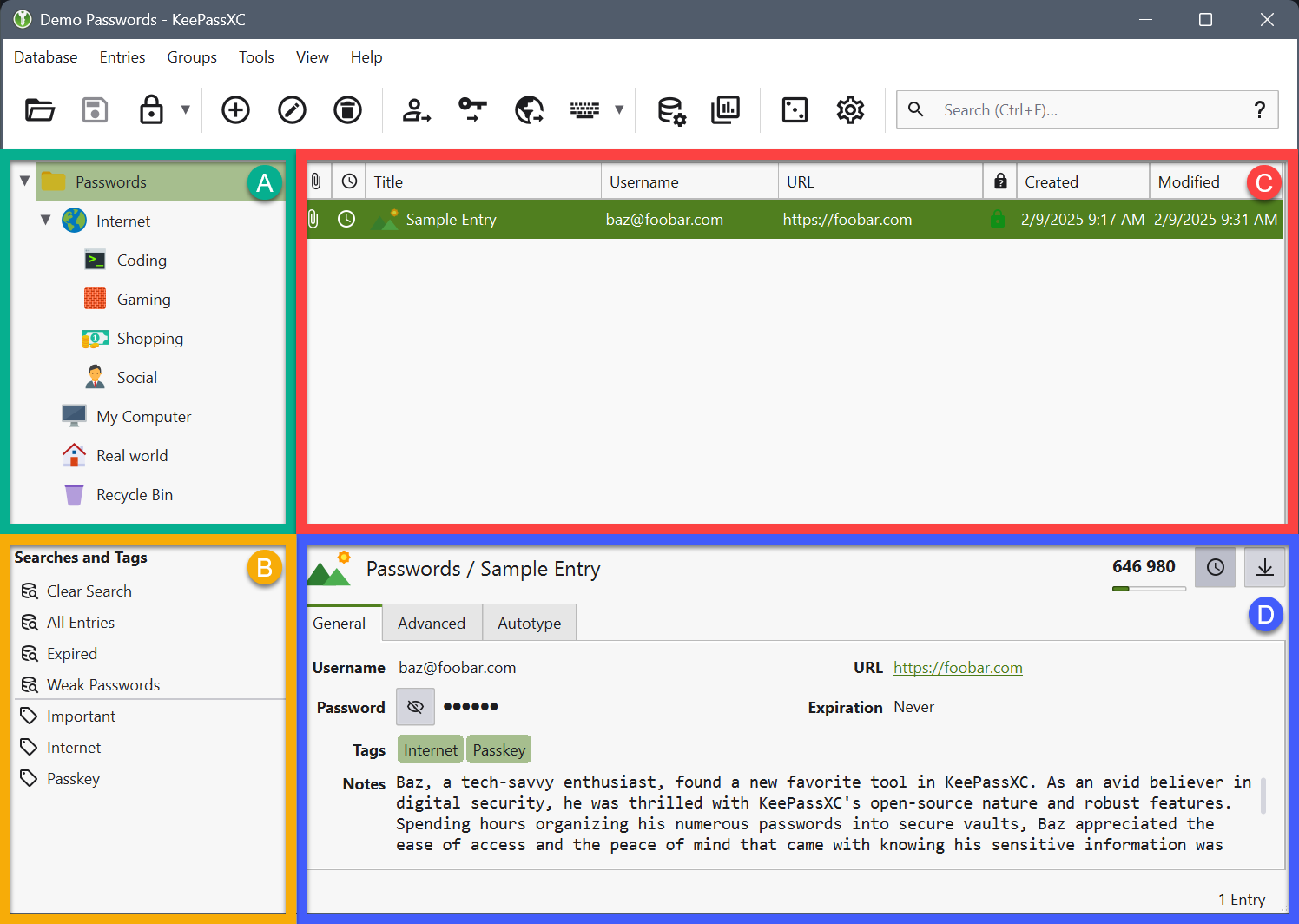
The KeePassXC desktop interface provides a logical, folder-based hierarchy for managing high-security credentials and TOTP codes.
2025 Performance Evaluation: Stability and Speed
Because it runs natively on your hardware without a cloud middleman, KeePassXC is blazingly fast and works perfectly in air-gapped or high-latency environments.
Key Performance Indicators (2025)
- Startup Time: Instantaneous database decryption, especially when utilizing Argon2id optimized for your specific hardware.
- Cross-Platform Sync: While manual, using Syncthing or Nextcloud to move your .kdbx file provides a robust, decentralized sync experience.
- Resource Impact: Extremely lightweight. It consumes minimal RAM and CPU, making it ideal for background use on older hardware or Linux workstations.
- Reliability: 100% functional without an internet connection. Your passwords are always accessible, even during a global network outage.
For users who value reliability over convenience, KeePassXC provides a “forever” solution that isn’t subject to company buyouts or subscription price hikes.
Expert Setup & Hardening Guide
To achieve the highest level of security with KeePassXC, follow these critical steps:
- Use a Key File: In addition to your master password, generate a Key File and store it on a separate physical device (like a dedicated USB drive).
- Configure Database Lock: Set your database to auto-lock after 60 seconds of inactivity or whenever the computer is put to sleep.
- Tune Argon2id: In Database Settings > Security, use the “Benchmark” tool to set your Argon2id parameters to take roughly 1 second to decrypt for maximum protection.
- Disable Clipboard History: Ensure your OS clipboard manager is configured to ignore KeePassXC or set the app to clear the clipboard after 10 seconds.
- Backup Strategy: Use the 3-2-1 backup rule for your .kdbx file. Keep one copy on your PC, one on an encrypted USB, and one in a secure offsite location.
Who is KeePassXC Best Suited For?
- Privacy Extremists: Users who want zero data footprint on third-party servers.
- Developers & SysAdmins: Those who need integrated SSH Agent support and CLI tools for their daily workflow.
- Tech-Savvy Seniors & Hobbyists: People who enjoy full control over their software and don’t want a subscription.
- Air-Gapped Environments: Perfect for secure workstations that are never connected to the public internet.
Who Should Consider an Alternative?
- Beginners: The lack of built-in sync and the manual database management may be overwhelming for non-technical users.
- Mobile-First Users: While Android (KeePassDX) and iOS (Strongbox) apps exist, they are third-party ports and require manual file syncing.
- Collaboration Teams: Lacks the seamless vault sharing features found in Bitwarden or 1Password for large organizations.
Top Offline & Private Alternatives
Bitwarden (Self-Hosted)
Primary Strength: Offers a **Modern Web UI** and seamless sync, but allows you to host the server yourself for total data control.
Strongbox (iOS/macOS)
Primary Strength: The best **KDBX-compatible** app for Apple users. It provides a highly polished mobile experience for KeePassXC databases.
Proton Pass
Primary Strength: A **Swiss-based cloud** alternative. While not offline, it offers superior privacy laws and integrated email masking.
Final Verdict: The Ultimate Tool for Data Sovereignty
/ 10.0
KeePassXC is the standard-bearer for local-first security. In an era of constant cloud breaches, it offers mathematical certainty that your data remains private as long as your physical device is secure. It is powerful, fast, and entirely free. While the learning curve is steeper than its cloud competitors, the reward is absolute peace of mind and total control over your digital identity.
Professional Security Conclusion
If your threat model excludes trusting the cloud and you value open-source transparency above all else, KeePassXC is the only password manager you will ever need.
Take Back Control of Your Passwords
Download KeePassXC and start building your private, offline security fortress today.