
Cobian Reflector Review 2025: The King of Open-Source File Backups
Cobian Reflector Review – The Definitive Freeware Powerhouse for Secure File-Level Backup & Archiving (2025-2026)
Cobian Reflector is the modern, high-performance successor to the world-renowned Cobian Backup, rebuilt from the ground up to meet the security demands of the 2025 digital era. Developed by Luis Cobian, this .NET-based utility provides a robust, granular framework for automating backups without the “bloat” or cost of commercial suites. In 2025, Cobian Reflector remains the top choice for system administrators and power users who require native SFTP support, AES-256 encryption, and the ability to run as a Windows Service for headless server environments. Whether you are backing up a mission-critical database or a personal media collection, Cobian Reflector offers an unrivaled balance of transparency, flexibility, and rock-solid reliability that commercial software often struggles to replicate.
VERIFIED DATA: Cobian Reflector (v2.7.x+) is the official evolution of the “Gravity” series. In 2025, it continues to receive stability updates, ensuring full compatibility with Windows 11 and Windows Server 2025. It remains 100% freeware for both personal and commercial use, maintaining a “Zero-Bloat” philosophy that excludes telemetry, advertisements, or bundled “crapware.”
The “Reflector” Standard: 2025 Technical Metrics
Cobian Reflector is not a disk-imaging tool; it is a File-Level Backup Engine. It treats your data as distinct objects, allowing for surgical precision in what is protected and how it is stored.
| Capability Metric | Cobian Reflector 2025 Standard | Expert Technical Analysis (2025-2026) |
|---|---|---|
| Connectivity | Includes native SFTP support (missing in legacy Cobian), making it compliant with 2025 enterprise secure transfer mandates. | |
| Backup Logic | Full, Incremental, Differential | The task engine handles complex rotations, ensuring minimal bandwidth usage by only transferring changed blocks or files. |
| Encryption Strength | AES-128, 192, 256 | Archives can be password-protected at the file or container level, providing Zero-Knowledge security on the destination. |
| Operating Mode | App or Windows Service | Running as a service allows the backup to execute unattended even when no user is logged into the system. |
| DPI Independence | Vector UI (WPF) | Modern UI utilizes Windows Presentation Foundation, ensuring it looks crisp on 4K and 8K high-DPI monitors. |
Deep Dive: Reclaiming Data Sovereignty with Cobian Reflector
In an era where most backup solutions try to lock you into a subscription or a proprietary cloud vault, Cobian Reflector stands as a champion of Format Portability. It creates backups in standard ZIP, ZIP64, or 7-Zip formats, ensuring that your data can be recovered by any machine, anywhere, without needing a specific license or active internet connection.
1. The .NET Evolution: Speed and Stability
The move from the old Delphi-based architecture to .NET 4.6+ was more than just a cosmetic change.
- 64-Bit Native: Reflector operates as a true 64-bit program on modern systems, allowing it to leverage more RAM for high-speed indexing of millions of files.
- Multi-Threaded Execution: It can process multiple files simultaneously, significantly reducing the “Backup Window” for massive datasets.
- Reduced Resource Footprint: Despite its power, it consumes minimal system resources while idle, sitting silently in the background until the next scheduled task.
2. SFTP & Secure Remote Archiving
One of the primary reasons to choose Reflector over legacy backup tools is its native SFTP (SSH File Transfer Protocol) integration.
In 2025, plain FTP is no longer an acceptable standard for security professionals. Cobian Reflector allows you to securely tunnel your backups to a remote NAS, a dedicated server, or a Raspberry Pi across the internet. By combining SFTP transfers with AES-256 local encryption, you create a dual-layer defense: your data is encrypted in transit by SSH and at rest by Cobian’s archive engine.
3. Advanced Automation: Pre- and Post-Events
Reflector isn’t just a copy-paste tool; it is a Task Orchestrator.
- Command-Line Events: You can script the software to close a specific program (like a database engine) before the backup starts and restart it once the task is complete.
- Log Mailing: In 2025, Reflector’s mailing engine has been updated to handle modern SMTP requirements, sending you a detailed report of every success or failure directly to your inbox.
- Volume Shadow Copy (VSS): It integrates seamlessly with Windows VSS to backup locked or open files, ensuring that your Outlook PST or live documents are never missed.
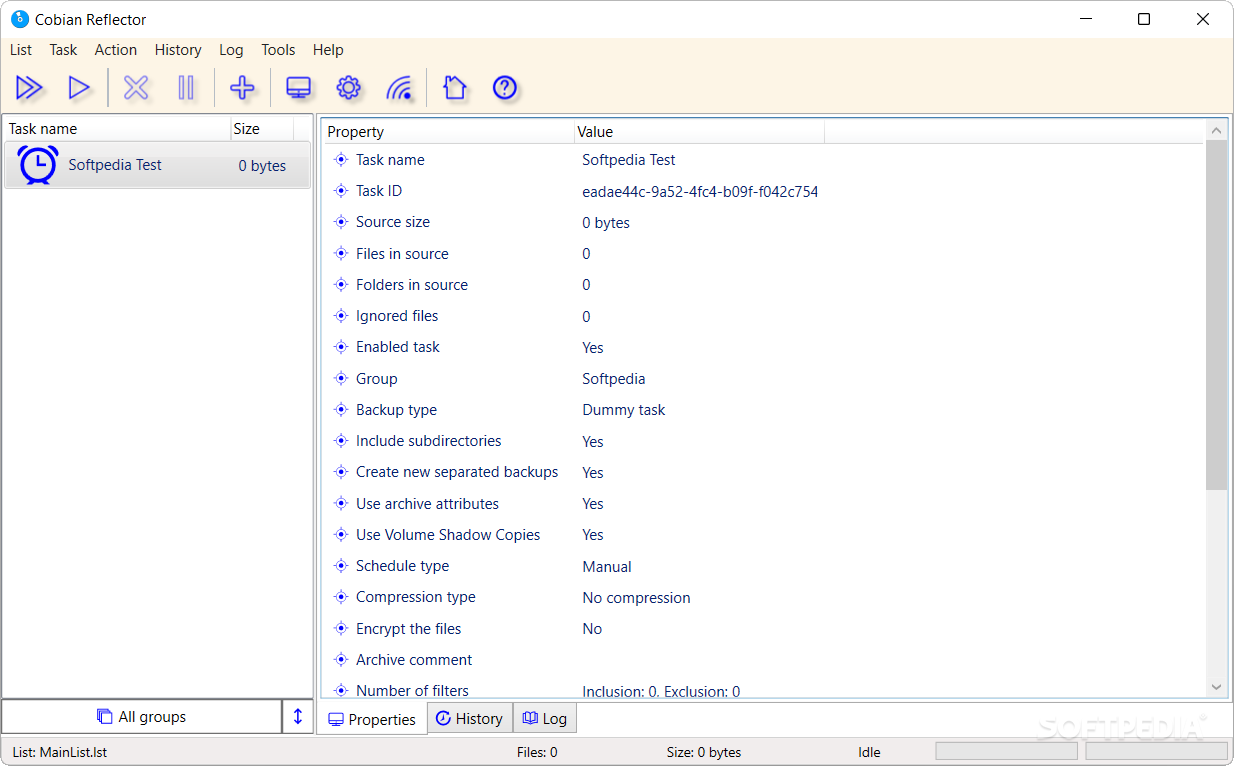
The Cobian Reflector 2025 Interface: Modern, DPI-independent, and designed for high-precision backup scheduling.
Expert Configuration: The Professional “Set & Forget” Setup
To achieve “Enterprise-Grade” reliability with Cobian Reflector in 2025-2026, you must optimize your task settings. Follow this specialist workflow:
- Choose “Service Mode” with a Dedicated Account: To avoid permission issues, run Reflector as a Windows Service under a specific user account that has read access to your source and write access to your destination.
- Implement a 3-2-1 Rotation: Create one task for a Daily Incremental backup and a second task for a Weekly Full backup. Use the “Full copies to keep” setting to automatically purge old archives and save space.
- Use Exclude Filters Wisely: Don’t waste space on temporary files. Add masks to exclude `*.tmp`, `*.cache`, and `node_modules` folders to keep your archives lean and fast.
- Enable SFTP Compression: If backing up over a slow connection, enable “Transfer Compression” in the SFTP settings to reduce the amount of data moving over the wire.
- Password Protect the UI: In the security settings, add a password to the user interface. This prevents unauthorized users from modifying your backup tasks or seeing your SFTP credentials.
Who is Cobian Reflector Best Suited For?
- IT Administrators: Managing Windows servers who need a reliable, scriptable way to archive file shares or web directories.
- Privacy Advocates: Who refuse to store their data in “black box” cloud formats and demand local control over their encryption keys.
- Small Businesses: Requiring professional-level backup automation without the overhead of monthly subscription costs.
- System Builders: Looking for a lightweight, “Zero-Junk” utility to pre-install on customer machines for automated data safety.
Comparison: Cobian Reflector vs. Veeam vs. Duplicati
Duplicati
Primary Strength: Native support for S3, Google Drive, and OneDrive. Weakness: Uses a proprietary database and block-level deduplication that can be prone to corruption compared to Cobian’s simple “Standard Archive” approach.
Veeam Agent (Free)
Primary Strength: Unbeatable Bare-Metal Recovery (imaging) capabilities. Weakness: Heavily resource-intensive and lacks the “simple file copy” transparency that Cobian provides for daily document archiving.
Macrium Reflect
Primary Strength: The gold standard for cloning and disk imaging. Weakness: No longer offers a “Free Forever” version for home users; primarily focused on the entire disk rather than specific file sets.
Pros & Cons: The Honest Data Professional’s Reality
The Pros
- 100% Free: No features locked behind a “Pro” version; no ads or tracking.
- Transparent Format: Backups are standard ZIP/7z files—no proprietary software needed for recovery.
- Powerful Scheduling: Near-infinite combinations of timers, days, and event triggers.
- Modern UI: Fully scalable for high-resolution 2025 display environments.
The Cons
- Learning Curve: Not intended for “tech-phobic” users; requires basic knowledge of file paths and permissions.
- No Cloud Connectors: Lacks built-in buttons for Dropbox or S3 (requires 3rd party mounting software).
- Manual Recovery: Unlike “one-click” restore tools, restoring a Cobian backup involves manually extracting the archives.
Final Verdict: The Undisputed Legend of File-Level Archiving
/ 10.0
Cobian Reflector is a rare gem in the 2025 software world. It successfully modernized a classic tool without sacrificing the core “Power-User” features that made it famous. By prioritizing transparency, SFTP security, and standardized formats, it remains the most trusted way to ensure your digital life is protected without being tied to a specific vendor. While it doesn’t offer the flashy “Cloud Sync” buttons of modern rivals, it offers something much more valuable: Absolute control over your data. If you want a backup tool that is fast, free, and future-proof, Cobian Reflector is the only choice.
Take Command of Your Data Protection
Don’t leave your files to chance. Use the tool trusted by millions of sysadmins. Download Cobian Reflector today.