
GlassWire Review 2025: The Ultimate Visual Network Security Guide

GlassWire Review – The World’s Most Intuitive Visual Firewall & Network Monitoring Dashboard (2025-2026)
GlassWire is the definitive solution for users who want to “see” their network rather than just manage it. Unlike traditional firewalls that rely on complex text-based logs, GlassWire provides a stunning, high-resolution real-time graph of every byte moving in and out of your device. It instantly alerts you to new connections, suspicious app behavior, and unexpected bandwidth gluttons. In 2025, with its advanced Anomaly Detection and Post-Quantum secure updates, GlassWire stands as an essential “second opinion” for your cybersecurity, revealing the hidden background activity that most antivirus software ignores.
VERIFIED DATA: GlassWire is developed by SecureMix LLC and is used by millions of individuals and small businesses to monitor endpoint security. In late 2025, GlassWire released Version 3.5, introducing a high-performance kernel mode driver and Post-Quantum secure communication for remote server monitoring. It is a certified Windows Firewall controller, enhancing the native OS security with a superior, user-friendly interface.
Visual Forensics: Technical Performance & Accuracy
GlassWire doesn’t just block; it audits. By analyzing traffic at the process level, it provides a “who, what, where” for every single packet on your system.
| Monitoring Metric | GlassWire 2025 Capability | Expert Technical Analysis (2025-2026) |
|---|---|---|
| Graph Granularity | The proprietary graphing engine displays spikes with millisecond accuracy, allowing users to catch “heartbeat” malware pings. | |
| Firewall Integration | Windows API / Bidirectional | Acts as a GUI for the Windows Firewall API, ensuring zero impact on system performance while adding “Ask to Connect” logic. |
| Remote Monitoring | Unlimited Servers (Elite) | Monitor your remote web servers or gaming rigs from one desktop. All remote data is now PQ-encrypted in the 2025 build. |
| Usage History | Unlimited (Premium Plans) | The “Network Time Machine” allows you to scroll back months to see exactly what an app was doing during a specific hour. |
| WiFi Security | Evil Twin Detection | Alerts you if your WiFi SSID suddenly changes its MAC address or if an “Evil Twin” (rogue hotspot) appears nearby. |
The Deep Dive: Why Visualization is the Future of Security
For the average user, “firewall logs” are unreadable. GlassWire solves this by transforming complex IP data into a living map of your digital life. This visual-first approach isn’t just about aesthetics; it’s a critical security tool for identifying Zero-Day threats and unauthorized data exfiltration.
1. The “Ask to Connect” Paradigm Shift
Standard firewalls operate in “Allow by Default” or “Block by Default” modes, which can be disruptive. GlassWire Premium introduces “Ask to Connect”:
- Decision at the Edge: When a new application tries to access the internet for the first time, a small, elegant notification pops up. You can allow it or block it instantly.
- Preventing Silent Data Leaks: Many apps (including legitimate ones) send telemetry or private data to remote servers in the background. GlassWire forces these “silent” connections into the light.
- Profiles: In 2025, GlassWire supports location-based profiles. You can set it to “Ask to Connect” on public Starbucks WiFi but “Allow All” on your trusted home network.
2. Network Time Machine & Historical Auditing
If you notice your data cap was hit last night while you were sleeping, how do you find the culprit? GlassWire’s Network Time Machine is the answer.
By using the timeline slider, you can go back to 3:00 AM and see exactly which process (e.g., a Windows Update or a rogue torrent app) was consuming bandwidth. It shows the **IP address**, the **hostname**, and the **country** of the server being contacted. This historical context is vital for cleaning up “zombie” apps that drain your speed.
3. WiFi “Evil Twin” & Device Discovery
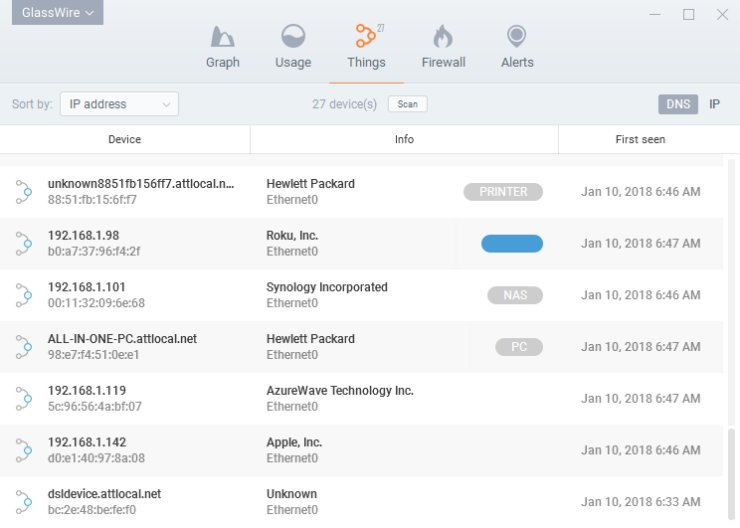
The 2025 version of GlassWire has significantly upgraded its “Things” tab. It scans your local network to show you every phone, printer, and smart IoT device connected to your router.
- New Device Alerts: Get an instant desktop notification if a neighbor or an intruder joins your WiFi.
- MAC Address Spoof Detection: Alerts you if a device’s hardware identity changes suspiciously.
- Evil Twin Protection: If a hacker sets up a fake WiFi network with the same name as yours to steal your password, GlassWire will flag the inconsistency immediately.
The GlassWire 2025 Graph: Identifying a suspicious background connection to a foreign server in real-time.
GlassWire for Android: Mobile Security in 2025
The mobile landscape is plagued by “Data-Hungry” apps. GlassWire for Android provides the same visual clarity on your smartphone as it does on your desktop.
In 2025, the Android app has been updated to handle 5G data tracking with extreme precision. It allows you to set data limits and alerts before you incur overage charges. More importantly, it reveals which apps are starting up and contacting servers the moment you unlock your phone, helping you spot mobile spyware or adware that hides from traditional scanners.
Expert Setup & Optimization Guide
To get the most out of GlassWire as a professional-grade security tool, follow these expert-level steps:
- Enable “First Network Access” Alerts: This is the most important setting. It ensures you are notified the second a new app tries to talk to the internet.
- Configure the Mini-Graph: Turn on the “Mini Viewer” and set its transparency. This allows you to see a small live graph on your desktop at all times, helping you spot data spikes without opening the full app.
- Set Up Custom Profiles: Create a “Strict” profile for travel (blocking everything except your browser and VPN) and a “Home” profile for regular use.
- Integrate VirusTotal: In the settings, you can add your VirusTotal API key. This allows GlassWire to automatically scan suspicious apps against 70+ antivirus engines with one click.
- Review the “Usage” Table Weekly: Once a week, sort your usage by “Hosts.” If you see a lot of data going to a country you don’t recognize, investigate that application immediately.
Who is GlassWire Best Suited For?
- Power Users & Gamers: Those who need to monitor ping, server location, and ensure no background apps are stealing their bandwidth.
- Remote Workers: Individuals using personal PCs for work who need to ensure no data is leaking to unauthorized servers.
- Security Beginners: Anyone who finds traditional firewalls too complex but wants to understand their network behavior.
- Metered Data Users: People on limited mobile hotspots or satellite internet who need to account for every megabyte.
Comparison: GlassWire vs. The Competition
Little Snitch (Mac)
Primary Strength: The gold standard for macOS. Offers deeper per-port control than GlassWire. Weakness: Only available for Mac; can be overwhelming with prompts.
NetLimiter
Primary Strength: Focuses on **bandwidth throttling**. You can limit the speed of specific apps. Weakness: Lacks the visual security alerts and “Time Machine” of GlassWire.
TinyWall
Primary Strength: Lightweight, free, and no-frills. Weakness: Zero visualization; purely a simplified firewall controller for advanced users.
Pros & Cons: A 2025 Reality Check
The Pros
- World-Class UI: The most beautiful and informative network graph in existence.
- Malware “Radar”: Catch background connections that antivirus software often misses.
- Lightweight Service: Minimal CPU impact compared to traditional packet sniffers.
- Privacy First: GlassWire does not upload your traffic data to the cloud.
The Cons
- Subscription Costs: The best features (Ask to Connect) require a paid plan (~$35/year).
- No iOS Support: Due to Apple’s sandbox restrictions, GlassWire is currently unavailable on iPhone.
- Windows Firewall Dependency: It cannot be used alongside some other third-party firewalls that disable the Windows engine.
Final Verdict: The Definitve “Security Radar” for 2025
/ 10.0
GlassWire is a rare security tool that is actually fun to use. It transforms the “black box” of your internet connection into a transparent, actionable dashboard. While the free version is an excellent monitoring tool, the **Premium** version is where the true security value lies—giving you the power to intercept connections before they even happen. In 2025, with the rise of AI-driven malware and background telemetry, GlassWire is the essential “Visual Radar” that every Windows and Android user should have in their toolkit.
Visualize Your Security Today
Stop wondering what your computer is doing in the background. Install GlassWire and take command of your data.