
Shodan Review 2025: The World’s Most Dangerous (and Useful) Search Engine

Shodan Review – The Definitive Search Engine for the Internet of Things (2025)
Shodan is the world’s most powerful search engine for discovering internet-connected hardware, ranging from simple webcams to industrial power plants. Unlike Google, which crawls the World Wide Web, Shodan crawls the entire Internet by probing IP addresses and parsing service banners. It provides a transparent view of the world’s digital attack surface, identifying open ports, software versions, and misconfigured vulnerabilities. In 2025, it remains the essential tool for cybersecurity professionals to track “Shadow IT” and protect critical infrastructure from global exposure.
VERIFIED DATA: Shodan currently indexes over 200 different services and protocols. In late 2025, security researchers used Shodan to identify over 1,100 publicly exposed LLM servers (Ollama). Its data is utilized by Fortune 500 companies and law enforcement agencies to assess third-party risk and identify compromised assets before they can be exploited by malicious actors.
Search Metrics: Technical Performance & Capabilities
Shodan functions by scanning the IPv4 space (and increasingly IPv6) and analyzing the “banners”—metadata returned by a service when it is queried. This allows for precise identification of hardware and software configurations without visiting a website.
| Capability Metric | Shodan Standard | Expert Technical Analysis |
|---|---|---|
| Device Coverage | (10/10) | Indexes everything from Smart Fridges and Webcams to Nuclear Power Plants (SCADA) and medical devices. If it has an IP, Shodan will find it. |
| Vulnerability Scanning | vuln: filter (Premium) | The “vuln” filter allows users to find devices susceptible to specific CVEs (e.g., Heartbleed or BlueKeep), making it a high-speed vulnerability research engine. |
| Network Monitoring | Shodan Monitor | Allows organizations to monitor their own netblocks. It sends instant alerts if a new service is detected or if an unexpected port is opened to the public. |
| Developer Access | Full REST API | Provides a robust API for automated reconnaissance. In 2025, it is the backbone of most External Attack Surface Management (EASM) platforms. |
| Visual Intelligence | Shodan Images | Collects and indexes screenshots of remote desktops (RDP), VNC servers, and webcams, providing immediate visual verification of exposure. |
Shodan Architecture: How the “Scanner of Scanners” Works
Shodan’s power lies in its distributed scanner network, which constantly probes the internet to keep its database current.
1. Banner Grabbing & Metadata Extraction
This is the core “eye” of Shodan. It doesn’t look at content; it looks at the handshake.
- Service Identification: By parsing the response from ports like 21 (FTP), 22 (SSH), or 554 (RTSP), Shodan identifies the exact software version and manufacturer.
- Header Analysis: Extracts HTTP headers that often reveal Internal IP addresses or software vulnerabilities through “Server” tags.
- Certificate Parsing: Analyzes SSL/TLS certificates to link IPs to specific organizations, even when the IP is otherwise anonymous.
2. The Shodan Hacking Database (SHDB)
A curated dictionary of search queries that target specific technologies.
- IoT Targeting: Specialized dorks to find Cisco routers, Netgear switches, or default-credential webcams with a single click.
- SCADA/ICS Search: Includes filters for Industrial Control Systems like Modbus and Siemens S7, vital for critical infrastructure security audits.
- Ollama & LLM Exposure: Updated for 2025, the database now includes fingerprints for exposed AI inference servers and local LLM instances.
3. Geographic & Network Filtering
Shodan allows you to narrow down your search from the global level to a specific room.
- Geo-Filters: Use `city:`, `country:`, or even exact `geo:` coordinates to find devices in a specific building or street.
- ASN & Org Filters: Target specific Internet Service Providers or organizations (e.g., `org:”Amazon.com”`) to map their infrastructure.
- Shodan Maps: A visual overlay that allows you to pan and zoom across the globe to see the density of connected devices in real-time.
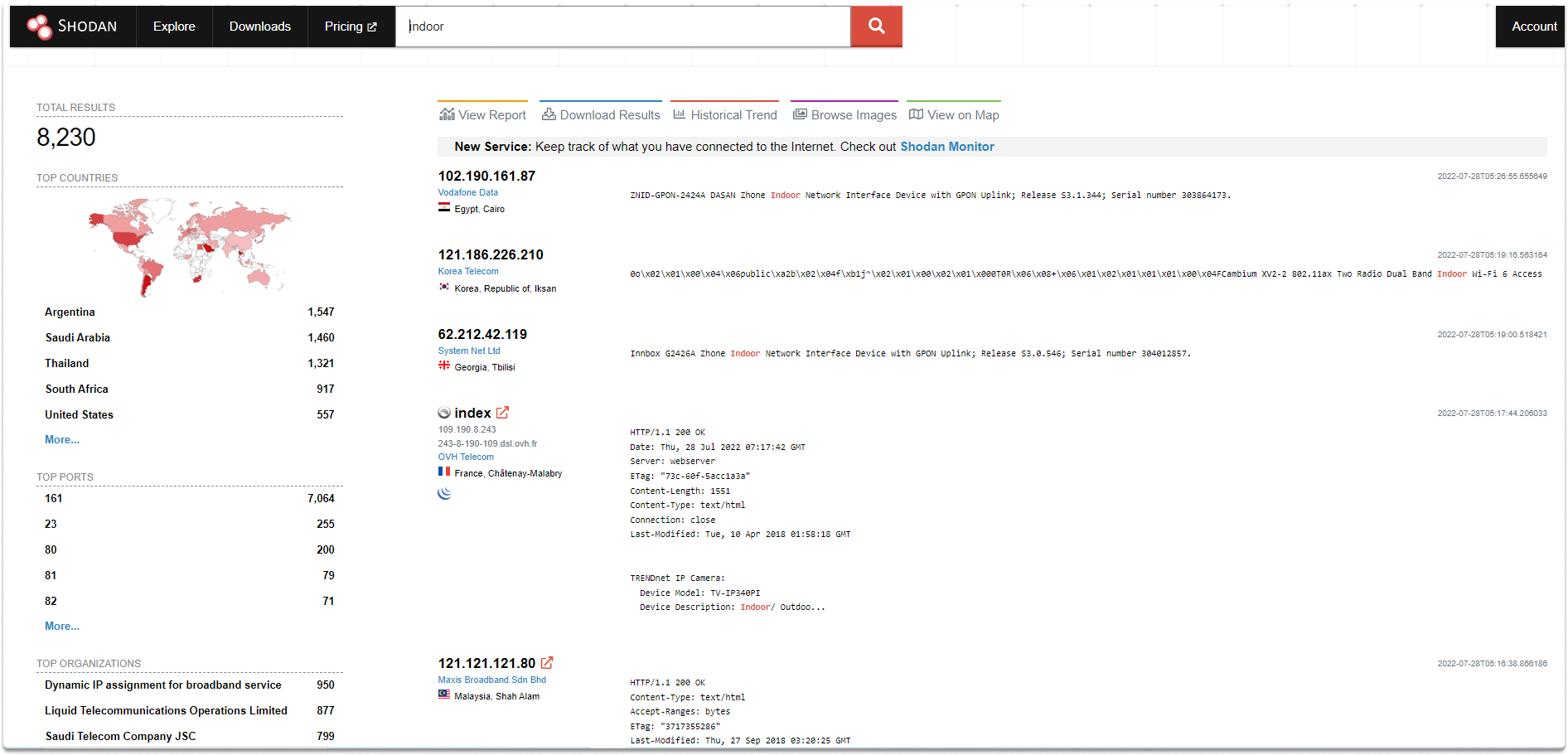
The Shodan dashboard provides a high-level breakdown of top countries, ports, and operating systems for every search query.
2025 Evaluation: Pricing and Value
Shodan remains one of the most accessible professional security tools, offering a one-time membership for individuals and robust plans for businesses.
Current Pricing Tiers (2025)
- Membership ($49 One-Time): The gold standard for individuals. Provides lifetime access to browse results, use filters, and small amounts of API credits.
- Freelancer ($69/mo): Aimed at consultants. Up to 1 million results per month and access to most advanced filters.
- Small Business ($359/mo): Includes 20 million results and the critical “vuln” search filter for vulnerability management.
- Enterprise ($1,099/mo+): Full data license, including real-time firehose access, bulk data downloads, and premium support.
For students and professors, Shodan offers Free Academic Upgrades if you sign up with a `.edu` email address—a testament to its commitment to research.
Expert Search Hardening: How to Find the Unfindable
Maximize your reconnaissance with these advanced Shodan search operators:
- Filter by Product Version: Use `product:”Apache” version:”2.4.49″` to find servers specifically vulnerable to path traversal exploits.
- Identify Default Credentials: Search for strings like `default password` or `login: admin` combined with `has_screenshot:true` to find unsecured IoT panels.
- Map a Corporate Network: Use the `net:` filter (e.g., `net:204.51.94.0/24`) to see every exposed service on a company’s specific IP range.
- Check for Ransomware: Search for `READ_ME_TO_RECOVER_YOUR_DATA` to find databases that have already been compromised and encrypted.
- Find Exposed Webcams: Use the `RTSP` protocol filter (e.g., `port:554 has_screenshot:true`) to discover unprotected video streams globally.
Who is Shodan Best Suited For?
- Penetration Testers: For rapid external reconnaissance and mapping out a client’s digital assets.
- Security Researchers: To track global vulnerability trends and identify the spread of malware/botnets.
- Enterprise IT Managers: To identify Shadow IT and ensure no unauthorized devices are connected to the corporate network.
- Market Researchers: To see which brands and software versions are leading in real-world deployment.
Who Should Consider an Alternative?
- Academic Pure-Security Researchers: While Shodan is great, Censys offers deeper analysis of SSL/TLS certificates for academic use.
- Budget-Conscious Beginners: The free account is very limited; you truly need the $49 Membership to see the tool’s real power.
- China-Focused Researchers: For infrastructure mapping within China, ZoomEye often provides better regional data coverage.
Top Cybersecurity Search Alternatives
Censys
Primary Strength: Superior for **Certificate Analysis**. If you need to map infrastructure via SSL/TLS chains, Censys is the industry leader.
ZoomEye
Primary Strength: Excellent **Asian Market Coverage**. Offers a more retro-visual interface and very competitive datasets for global IoT.
GreyNoise
Primary Strength: Best for **Internet Background Noise**. It tells you which IPs are “scanners” (like Shodan) so you can ignore them and focus on real threats.
Final Verdict: The Ultimate Tool for Internet Transparency
/ 10.0
Shodan is the “Google for the dark side of the internet”—though its purpose is entirely defensive. In 2025, it remains the most accessible and powerful tool for understanding the vulnerabilities of our connected world. Whether you are hunting for exposed SCADA systems or securing your own small business, the level of insight Shodan provides is unparalleled. It is the single most important tool in any cybersecurity professional’s arsenal for external asset discovery.
Expert Security Conclusion
In an era where “Security through Obscurity” is dead, Shodan is the flashlight that reveals exactly what you have exposed before the hackers find it for you.
Secure Your Digital Footprint
Don’t wait for a breach. Use Shodan to scan your own networks and close the doors to your sensitive data today.